
VoIP CRM Integration Services For UK Businesses
BhavPro helps UK businesses connect VoIP phone systems with CRM workflows so calls, missed enquiries, contact records, notes, follow-up tasks and reporting work together.
Call Logging, Missed-Call Follow-Up And CRM Workflows
Recover - missed calls with tasks and reminders
Report -communication activity and follow-up quality
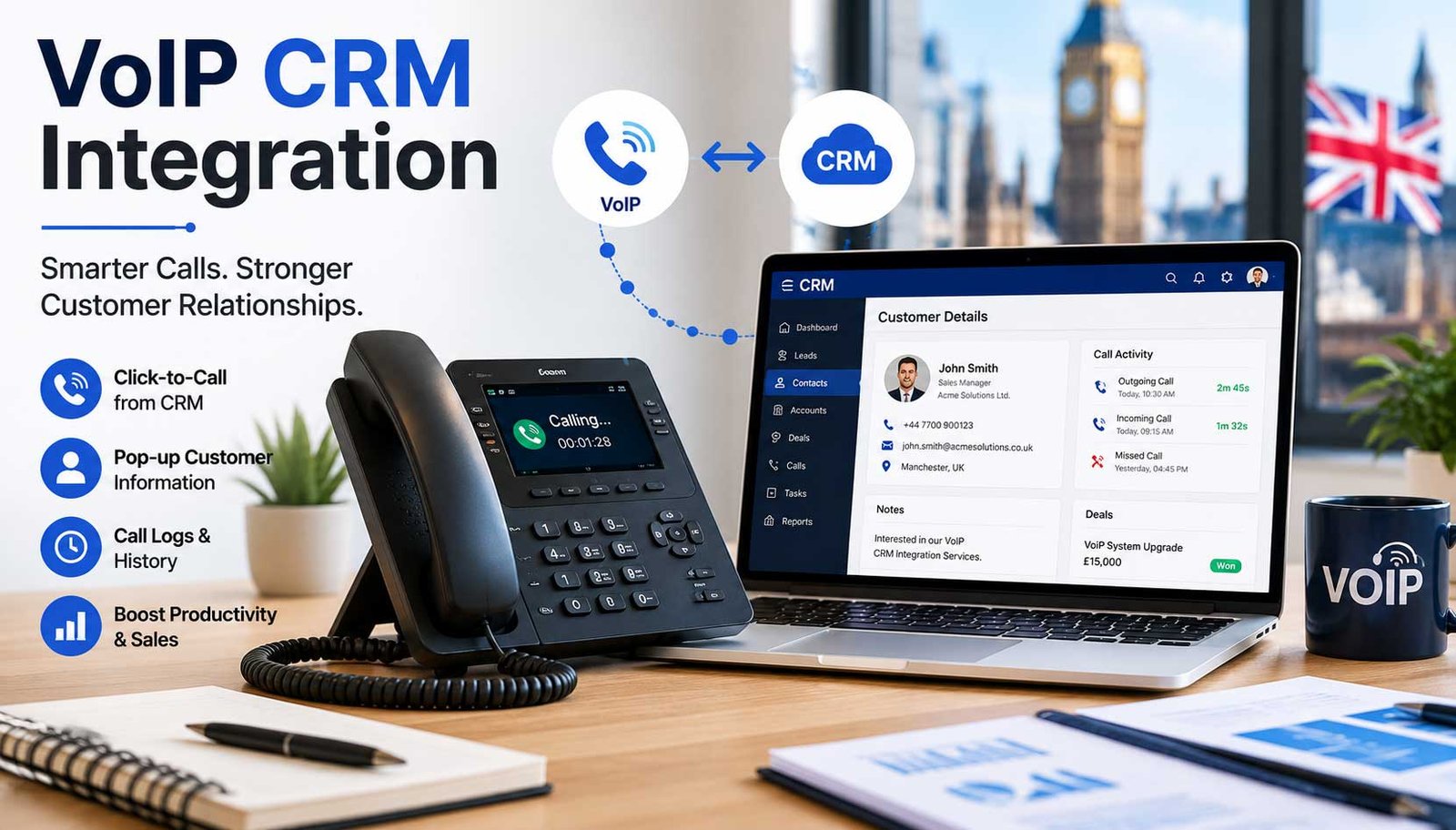
Fast Answer: VoIP CRM integration connects your phone system with your CRM so calls, contacts, missed enquiries, call notes, recordings, tasks, follow-up reminders and reporting are handled in one customer workflow.
What VoIP CRM Integration Does
VoIP CRM integration is not only about making calls from CRM. It is about keeping valuable customer conversations connected to the right records, actions and reports.
The Core Outcome
VoIP CRM integration connects your phone system with your CRM so calls, contacts, missed enquiries, call notes, recordings, tasks, follow-up reminders and reporting are handled in one customer workflow.
The goal is to stop valuable conversations disappearing into disconnected phone logs, inboxes, spreadsheets or staff memory.
How BhavPro Helps
BhavPro helps UK businesses design, configure and improve VoIP CRM workflows across sales, support, account management and service operations.
- Click-to-call and screen pop planning
- Contact matching and call logging
- Missed-call recovery and task creation
- Dashboards, reporting and AI-assisted summaries where suitable
Why VoIP CRM Integration Matters
Many businesses invest in cloud phones, hosted VoIP, CRM software and digital marketing, but still lose visibility at the point where a customer actually calls.
Common Visibility Gaps
- Calls are not logged against the right customer or lead
- Missed calls are not turned into tasks
- Sales teams forget follow-up actions
- Support teams lack call history
- Managers cannot see call outcomes
What A Good Integration Makes Visible
- Who called and which customer record was matched
- What happened during or after the call
- What needs to happen next
- Which enquiries were missed or delayed
- Which communication workflows need improvement
Business Point
A properly designed VoIP CRM integration helps teams see who called, what happened, what needs to happen next and which customer journeys are being delayed by communication gaps.
The Business Impact Of Disconnected Calling
When phone activity is disconnected from CRM, teams may still make and receive calls, but the business loses operational evidence.
What Teams Experience
- Leads are marked as “new” even after a call took place
- Customer complaints lack call context
- Repeat callers explain the same issue again
- Managers ask for call updates manually
- Sales follow-ups depend on individual discipline
- Call recordings, notes or outcomes are difficult to find
What The Business Loses
- Lower sales conversion from inbound enquiries
- Delayed response to high-value leads
- Inconsistent customer experience
- Weak accountability across teams
- Poor handover between users
- Reduced trust in CRM data
What BhavPro Integrates
BhavPro reviews the business workflow first, then defines how VoIP and CRM should connect.
Call Activity Against CRM Records
Automatically or manually record call activity against leads, contacts, accounts, opportunities, tickets or cases.
- Caller number and matched contact
- Call direction, duration and result
- Notes, recording link and follow-up task where appropriate
Contact And Account Matching
Match inbound and outbound calls to the right CRM record where possible.
- Known contact and account lookup
- Phone number normalisation
- Manual fallback when no match exists
Missed-Call Recovery
Turn missed calls into visible CRM actions so enquiries are not forgotten.
- Automatic missed-call tasks
- Priority tagging and queue assignment
- SLA or response-time monitoring
Click-To-Call And Screen Pop
Help users call from CRM and see relevant customer information when a call arrives.
- Click-to-call from contact records
- Screen pop for matched customers
- Customer history and faster handling
Call Notes, Outcomes And Tasks
Create a consistent process after every important call.
- Call outcome dropdowns
- Next-step task and follow-up date
- Opportunity, ticket or internal note update
AI-Assisted Call Workflows
Where suitable, AI can support call summaries, topic tagging, CRM note drafting and next-step suggestions.
- Privacy, consent and access controls
- Human review for higher-risk outputs
- Operational quality and compliance checks
BhavPro can also help turn call activity into useful business visibility, including calls by user, missed calls, response time, call outcome, call source, follow-up compliance, support call volume and account communication history.
VoIP CRM Integration Options
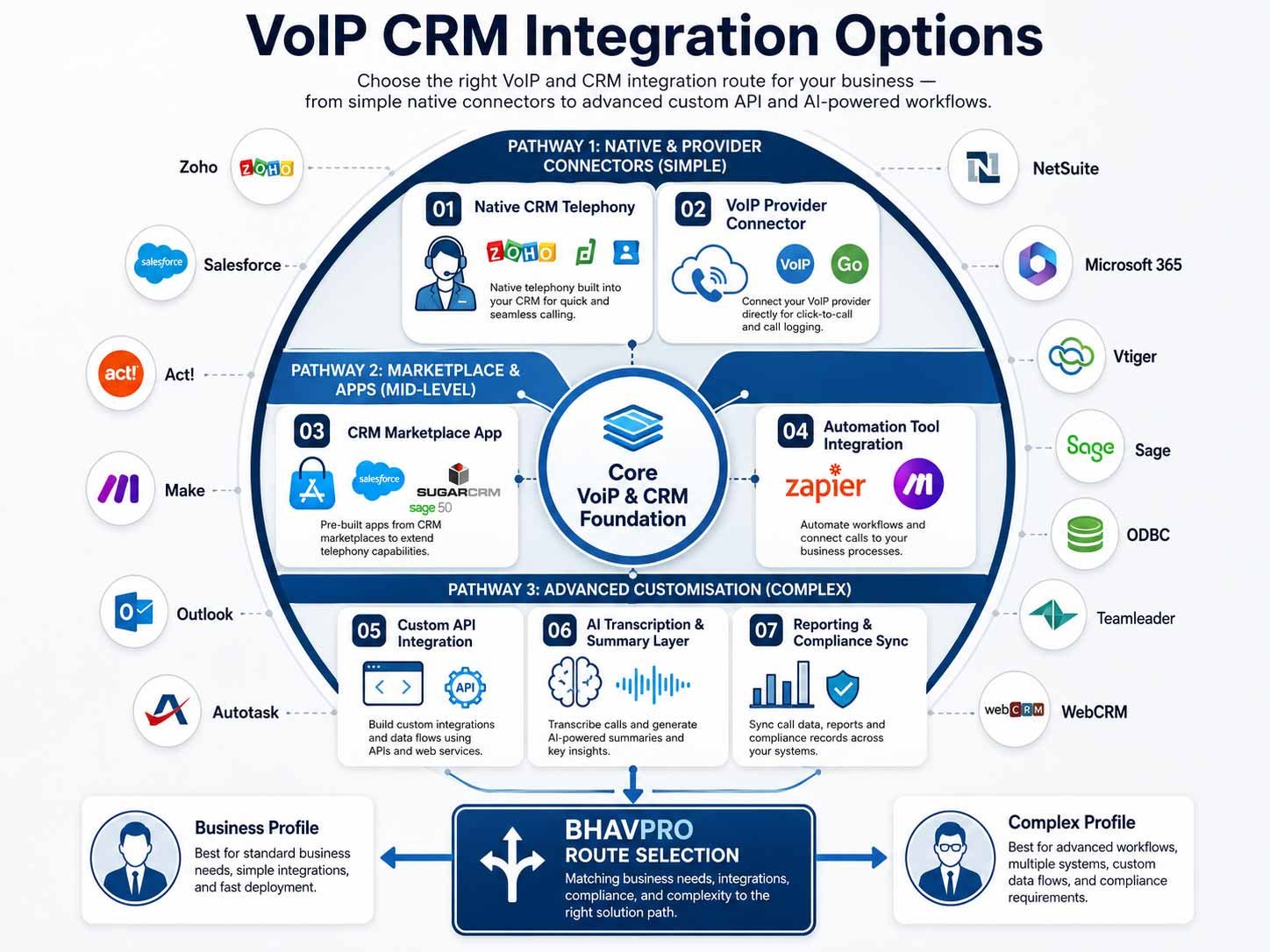
The right integration route depends on the VoIP platform, CRM, available APIs, licensing, call-flow complexity and reporting needs.
Native CRM Telephony
Use built-in CRM calling or supported phone connectors where the native feature set matches the workflow.
VoIP Provider Connector
Use the VoIP platform’s marketplace connector where it can support call logging, users and basic follow-up visibility.
CRM Marketplace App
Use CRM marketplace apps when they offer stable connection paths and fit your CRM plan or tier.
Automation Tool Integration
Use Zapier, Make or similar tools for simple missed-call alerts, tasks, notifications and routing workflows.
Custom API Integration
Use custom API integration when native connectors cannot support the required business rules, reporting or multi-system workflows. For more complex connections involving CRM, VoIP, SaaS platforms, websites, webhooks or multiple business systems, explore BhavPro’s API Integration Services.
AI Transcription Or Summary Layer
Add AI summaries only after the core CRM and VoIP workflow is stable and privacy, consent and access rules are clear.
BhavPro Route Selection
BhavPro helps decide which route is appropriate rather than forcing unnecessary custom development. A simple connector may be enough for one business, while another may need custom workflow mapping, dashboards or an AI-assisted layer.
VoIP CRM Integration Capabilities & Supported Core Features
Our bespoke integrations establish reliable CTI loops, secure webhook listeners, and programmatic REST API pipelines. Review our baseline native system compatibilities or request a custom engine deployment.
| CRM Platform | Click-to-Call | Automated Call Logging | Real-time Screen Pop | Custom Webhook Support |
|---|---|---|---|---|
| Salesforce | Native Open CTI framework implementation. | Automatic Activity & Task creation matching call IDs. | Inbound contact record match on ring state. | Supported natively via Salesforce REST APIs. |
| HubSpot | Integrated embeddable calling widget UI. | Instant timeline interaction synchronization. | Smart matching via contact owner properties. | Supported via advanced workflow actions. |
| Zoho CRM | Telephony mapping through Zoho CRM (ZOHO CIR). | Automated population into dedicated Call Modules. | Instant new lead creation modal on unknown numbers. | Supported via personalized Deluge scripting. |
| Zendesk / Freshdesk | Top-bar top-level telephony widget placement. | Automated ticket generation containing call recording URLs. | Customer history & open ticket layout overlay. | Supported via Target/Webhook endpoints. |
| Bespoke Systems | Custom URL handler schemes (tel: protocol wrappers). | Direct SQL / NoSQL database stream logging. | Custom workplace alerting via WebSocket triggers. | Fully customized dedicated middleware proxy. |
Quick Comparison: VoIP CRM Integration Options For UK Businesses
Use this table to compare common integration routes before deciding whether you need a native connector, automation tool, custom API build or AI call-summary layer.
| Integration Route | Best For | Typical Benefit | Limitations | BhavPro Recommendation |
|---|---|---|---|---|
| Native CRM Telephony | Teams using CRMs with built-in calling or supported phone connectors | Faster setup Call logs, click-to-call and user adoption | Feature depth depends on CRM tier and provider support | Use when the native integration covers the real workflow without heavy customisation |
| VoIP Provider Connector | Businesses already using a VoIP platform with CRM marketplace integrations | Connects calls, records and users with less development work | May not support advanced workflow rules or reporting logic | Good first option when the business needs call logging and basic follow-up visibility |
| Automation Tool Integration | Simple missed-call alerts, tasks, notifications and routing workflows | Quick implementation and lower upfront cost | Can become fragile if workflows become complex | Use for lightweight workflows, but avoid overbuilding critical call operations this way |
| Custom API Integration | Complex workflows, multi-system routing, custom CRM fields and dashboards | Greater control over data, business rules and reporting | Requires clearer scope, testing, governance and support | Use when native connectors cannot support the required business process |
| AI Call Summary Layer | Teams needing call notes, summaries, topic tagging or next-step suggestions | Reduces admin and improves call visibility | Requires careful privacy, consent, access and quality review | Add after the core CRM and VoIP workflow is stable |
Suggested Pricing
Pricing depends on the VoIP platform, CRM, number of users, data complexity, workflow scope, reporting needs and whether AI-assisted call features are required.
Small Business Integration Starter
For micro-businesses and small teams needing basic native plugin activation, click-to-call, and standard connection setups.
Get StartedVoIP CRM Integration Review
For businesses that need to understand their current call and CRM workflow before choosing an integration route.
Book ReviewBasic CRM Call Logging Setup
For teams needing contact matching, click-to-call, simple call logging or basic CRM-connected calling.
Request SetupVoIP CRM Workflow Integration
For businesses needing missed-call recovery, tasks, routing, dashboards and CRM workflows.
Request ProposalAI Call Notes / Summary Layer
For teams needing call summaries, notes, topic tagging and next-step prompts where data and consent rules are ready.
Discuss AI LayerMonthly Communication Workflow Support
For businesses needing ongoing optimisation, workflow changes, user support and reporting improvements.
Request SupportFinal pricing should follow a review of your VoIP platform, CRM plan, user roles, call flows, reporting needs, integration route and support requirements.
What We Need From You
To review or implement VoIP CRM integration, BhavPro needs enough operational context to avoid building a connector that does not match how your team actually works.
System And Team Context
- Current VoIP provider or phone system details
- CRM platform and plan or tier
- User roles and teams
- Number of users or agents
- Call flows and business hours
- Inbound and outbound call requirements
Workflow And Reporting Requirements
- Missed-call handling process
- Current lead and customer journey
- Reporting requirements
- Call recording or compliance needs
- Required CRM fields
- Existing automations or integrations
What Happens After Integration
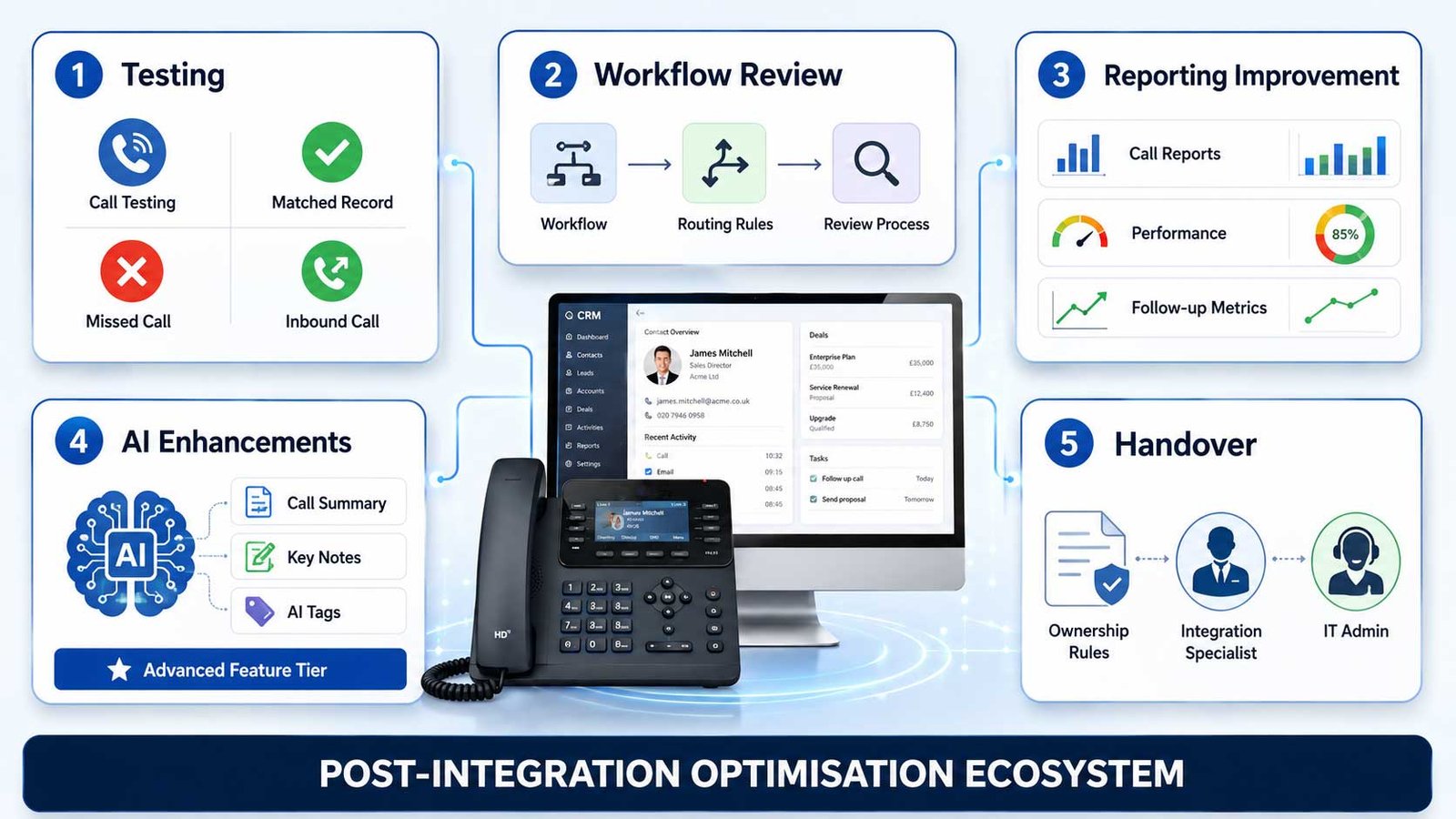
A good integration should not end once calls appear in CRM. The workflow must be tested, adopted, refined and measured after launch.
Testing
Test call logging, record matching, inbound calls, outbound calls, matched records, unmatched records and missed calls.
Workflow Review
Review missed-call workflows, call outcome options, assignment rules, user adoption and follow-up behaviour.
Reporting Improvement
Improve dashboards, review call and follow-up performance and adjust reporting so managers can trust the data.
AI Enhancements
Add AI summaries or note drafting only where call workflow, data quality, privacy and consent requirements are ready.
Handover
Create admin handover documentation and ownership rules so the integration can be maintained properly.
When This Service Is Not The Right Fit
VoIP CRM integration is valuable when the phone system and CRM can support the business workflow. Sometimes another service should come first.
- You only want to compare VoIP providers by price
- You are not using or planning to use a CRM
- Your phone system has no integration route or accessible data
- You need emergency telecom fault support
- You need PSTN replacement planning before CRM workflow design
- Your main issue is CRM structure rather than call workflow
- You want AI call summaries before basic call logging and CRM data quality are stable
In these cases, BhavPro may recommend a VoIP review, CRM implementation review or AI Business Systems Audit first.
VoIP CRM Integration Process
BhavPro uses a workflow-led process so the integration supports daily sales, support and communication accountability instead of only adding another connector.
Discovery
Review the current VoIP system, CRM, users, call flows, enquiry sources, customer journey and reporting needs.
Workflow Mapping
Map how calls should connect to leads, contacts, accounts, opportunities, tickets, cases or tasks.
Integration Route Selection
Choose the right path: native connector, marketplace app, automation tool, custom API integration, call tracking integration or AI layer.
Configuration And Build
Configure users, fields, call log mapping, call outcomes, tasks, missed-call alerts, routing rules and dashboard requirements.
Testing
Test inbound calls, outbound calls, matched records, unmatched records, missed calls, user permissions, data visibility and reporting.
Training And Handover
Train users on call notes, outcomes, tasks, follow-up, dashboards and ownership rules.
Go-Live And Hypercare
Review live usage, fix workflow gaps, refine dashboards and identify future improvements.
Every custom telephony loop and CTI mapping we construct is engineered to remain fully aligned with **UK GDPR** provisions and the **Information Commissioner's Office (ICO)** guidelines for automated call recording. Whether routing metadata streams into local database layers or off-site cloud storage arrays, data privacy controls are hardened natively at the protocol level.
Explore More Ways to Optimise Your Systems
Looking for a broader solution? Discover how we can help you streamline your entire business tech stack.
Google Reviews for BhavPro WordPress Plugins, SEO Tools & Business Automation
See more reviews on our [Google Business Profile], or leave your own experience!
Bhav was friendly, polite and professional. He listened to what we wanted and advised accordingly.We used BhavPro for a Windows 10 Pro to Windows 11 Pro upgrade and secure data migration for our business. Bhav handled the entire process smoothly, with minimal downtime.Our software setup and all client data were fully preserved, and everything worked exactly as before with no disruption to daily operations. Communication was clear and professional throughout, and the work was completed on time. Highly recommend BhavPro for IT support, system upgrades, and secure data handling.
We reached out to BhavPro because we were struggling to figure out the best VoIP setup for our business. They took the time to listen, explained the options in plain English, and recommended a provider that actually fit what we needed (and our budget). The whole process was straightforward, and switching over was way easier than we expected. Call quality is miles better now, and we’ve already saved money compared to our old system. What impressed us most was how BhavPro focused on finding the right solution rather than just selling something. If you’re considering VoIP or telecom consulting, we’d definitely recommend their advice and support. — SR Property Services
Working with BhavPro has honestly been a game changer for us. They didn’t just design a good-looking website — they made sure it was properly SEO-optimized and built to bring in real results. Not long after launching, we started noticing a huge jump in inquiries, and over time it’s grown to nearly 50 times more than before. That consistency has given us the confidence to open another site, which we never thought possible this soon. What we liked most was that BhavPro combined the technical side with genuine business advice. It felt like they cared about our growth as much as we did. We’d happily recommend them to anyone looking for a website that actually delivers and real SEO results. — Almari Designs Ltd
Frequently Asked Questions
What is VoIP CRM integration?
VoIP CRM integration connects your business phone system with your CRM so calls, contacts, notes, missed enquiries, follow-up tasks and reports are visible inside your customer workflow.
Can VoIP calls be logged automatically in CRM?
Can missed calls create CRM tasks?
Can BhavPro connect VoIP with HubSpot, Zoho, Salesforce or Pipedrive?
Can call recordings be linked to CRM records?
This may be possible depending on the phone system, CRM, storage model and compliance requirements. Recording access, retention, consent and user permissions must be considered carefully.
Can AI summarise calls into CRM notes?
Yes, where the call recording, transcription and CRM workflow allow it. This should be implemented carefully with privacy, consent, accuracy review and human oversight.
Is this part of PSTN switch-off planning?
What is the best first step?
Connect Calls, Customer Records And Follow-Up Before More Enquiries Are Lost
BhavPro helps UK businesses connect VoIP phone systems with CRM workflows so calls, missed enquiries, follow-up actions and communication reporting become easier to manage.