
Featured
Estimate CRM value, then move into consulting, implementation or custom development with a clearer business case.

Free CRM Implementation Cost Calculator UK

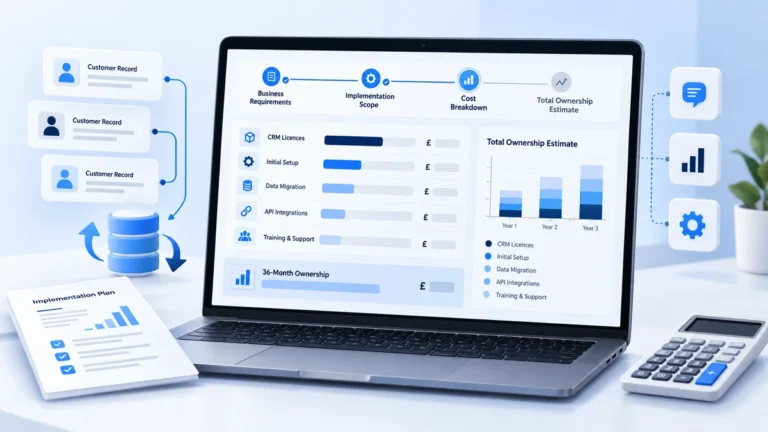
Estimate the budget for CRM setup, migration, integrations, training and ongoing licences. BhavPro's free calculator separates supplier cash expenditure from internal staff-time costs, with editable assumptions and a three-year ownership view.

CRM Implementation Cost Calculator UK

GBP ยท VAT excluded

Quick or Detailed Mode

36-Month Ownership

Calculate Your CRM Implementation Budget

Enter your project assumptions and generate the plugin's itemised Quick or Detailed report.

Free UK Calculator
FREE CRM IMPLEMENTATION BUDGET MODEL
01 / 03

CRM licences and ownership scope

Enter a realistic user count and vendor charges in GBP, excluding VAT. All fields can be edited.

Estimate detail Both modes use entered GBP assumptions, not a supplier quote. Detailed controls are optional and default to Quick values.
Seat count is assumed unchanged over the three-year projection.
Per-seat/month price, before VAT and one-off implementation fees.
Any fixed licence/platform charge in addition to user seats.
Include only add-ons not already contained in licences.
Separate CRM-to-email, telephony, website and back-office connectors.
Enter 0 if integration maintenance is included elsewhere.
Exclude already bundled support to avoid duplication.
02 / 03

Data migration and implementation effort

These are external supplier hours. The model does not automatically assume a vendor or implementation complexity.

Count customer, contact, activity or other agreed records without double counting.
Includes extraction, mapping, test import and reconciliation time as estimated.
Additional deduplication and quality work outside migration-hours assumption.
Multiplied by the number of selected integrations.
Workflows, fields, permissions, dashboards and agreed testing.
Paid supplier/trainer hours; employee attendance is entered separately.
03 / 03

Budget rates, internal effort and future assumptions

Supplier cash spend and internal staff opportunity cost are shown separately. One-time setup is not charged again in Years 2 or 3.

Applied to migration, cleaning, integration, customisation and vendor training hours.
Employee attendance per CRM seat, NOT the vendor delivery hours.
Opportunity cost; not added to supplier cash invoices.
Additional one-time supplier fee not represented by the hourly workstreams.
Applied to supplier labour plus fixed onboarding; not to recurring bills or internal staff time.
Applies to seat licences and base platform in Years 2 and 3 only.
Sensitivity changes external billable hours only; it is not a statistical forecast.
Step 1 of 3

Know the whole cost

What Does CRM Implementation Actually Cost?

Fast answer

A CRM implementation budget should include initial configuration and migration, recurring software and support, and the internal team time needed to deliver and maintain the system. The cheapest licence price does not necessarily mean the lowest total project cost.

There is no reliable one-price answer. A small business configuring a straightforward sales pipeline has a different cost structure from an organisation migrating years of customer history and integrating telephony, email, forms, billing and multiple departments.

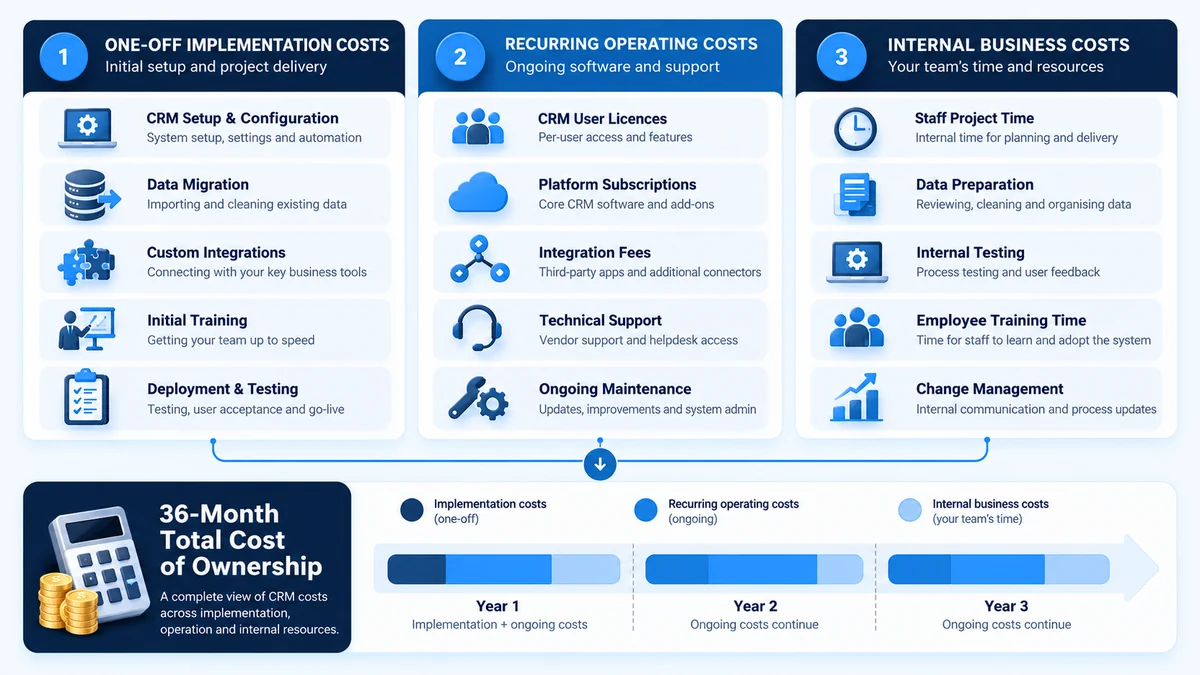
Your CRM implementation budget should distinguish the one-off cost of getting the system ready, the recurring cost of operating it, and the internal time needed to make it work. A low monthly subscription does not necessarily mean an inexpensive implementation.

CRM implementation cost breakdown comparing one-off setup costs, recurring software expenses and internal staff costs over 36 months.
Compare one-off implementation, recurring software and internal business costs across a 36-month CRM budget.

CRM Implementation Cost Categories

Understand how each cost contributes to your overall implementation and ownership budget.

Cost categoryWhat it coversHow it is represented
CRM licencesPaid users and any fixed platform feeMonthly recurring supplier charge
Configuration and customisationFields, pipelines, permissions, workflows and dashboardsEstimated external implementation hours
Data migrationExtraction, mapping, test imports and reconciliationRecord volume multiplied by assumed migration effort
Data cleaningDeduplication and correction outside the base migration allowanceAdditional external hours
IntegrationsWebsite forms, VoIP, email, finance, helpdesk and other connected systemsOne-off setup hours and optional ongoing connector charges
TrainingSupplier-led sessions and staff participationExternal training hours and separate internal staff-time cost
Onboarding and contingencyFixed initial fees and provision for implementation uncertaintyOne-off supplier expenditure
Ongoing support and add-onsMaintenance, subscriptions and optional servicesMonthly recurring charges
Internal CRM administrationTime spent maintaining the CRM after go-liveEconomic staff cost, not a supplier invoice
Three practical steps

Calculate Your CRM Implementation Cost in Three Steps

01

Step 1: Set your licence and operating assumptions

Enter the number of CRM users, monthly licence per user, any fixed platform fee, add-ons, integration count, recurring integration fees and support costs. Include only charges that apply to the same scenario; do not count an included connector or support service twice.

A licence for ten users at an assumed ยฃ40 per user per month gives ยฃ400 per month in seat charges before fixed platform fees, add-ons, support, integration charges and VAT. That is a mathematical example using an editable input, not a published market average.


02

Step 2: Define the implementation work

Enter the number of records to migrate and the effort required for migration, cleaning, integration setup, configuration and supplier-led training. The detailed mode also allows you to account for migration complexity, additional testing and security or governance work.

For example, 10,000 records at an assumed 1.5 migration hours per 1,000 records give 15 estimated migration hours before any separate data-cleaning allowance or complexity adjustment. A larger record count does not always mean proportionately greater difficulty: data quality, source systems and field mapping also matter.

03

Step 3: Add delivery rates, internal effort and ownership assumptions

Supply the external hourly rate, internal training time, staff cost, onboarding charge, contingency and estimated future licence increases. Choose the detailed mode where a phased rollout, pilot seats, changing user counts or ongoing internal CRM administration could materially affect the budget.

Generate CRM Cost Report to see the itemised estimate and compare different project scopes.

Choose the right level of detail

Quick Estimate or Detailed 36-Month Budget?

QUICK ESTIMATE

Start With a Straightforward Budget

For a defined setup or migration with a relatively clear number of users, connectors and delivery tasks.

  • 20 core user-entered inputs
  • One-off supplier implementation cost
  • Monthly licences, support and add-ons
  • Three-year ownership and effort sensitivity
DETAILED ESTIMATE

Plan Phased Delivery and 36-Month Ownership

For programmes where pilot seats, migration complexity, testing, governance and ongoing CRM administration change the picture.

  • Pilot seats and go-live timing
  • Additional testing and governance hours
  • Year 2 and Year 3 seat forecasts
  • Timed first-year cash flow and internal economic cost
Choose the mode inside the working calculator.

Both modes use your assumptions. Neither connects to live CRM supplier pricing, and neither promises a final quotation.

Transparent calculation model

The Formula Behind a Practical CRM Budget

The model begins with supplier effort by workstream. Estimated migration hours, cleaning, integration setup, configuration and training are costed using your entered implementation rate, with any fixed onboarding charge and selected contingency considered separately.

Recurring expenditure is calculated from the applicable licence seats, base platform charge, add-ons, integration fees and support. Internal project effort, employee training and ongoing administration can be valued economically without presenting that time as additional supplier invoices.

Budget viewKey inputsWhat it answers
One-off supplier setupWorkstream hours ร— external rate, fixed onboarding and contingencyWhat might need to be paid to implement the CRM?
Internal implementation effortStaff training and internal project hours ร— staff cost rateWhat capacity might the business need to allocate?
Monthly operating costSeats, licence price, platform, connectors, add-ons and supportWhat might the system cost to keep running?
Year 1 expenditureInitial supplier charges plus applicable monthly billsWhat is the likely first-year cash requirement under the scenario?
Three-year ownershipPlanned annual charges, relevant uplifts and internal effortHow do longer-term assumptions change the economics?
Sensitivity rangeLower and higher external implementation-hour assumptionsWhich one-off cost is most sensitive to uncertain delivery effort?

These outputs are planning scenarios, not audited costs, guaranteed savings or a calculation of CRM return on investment. VAT is excluded throughout the calculator.

Understand scope and uncertainty

Why CRM Budgets Commonly Change During Implementation

01

Data quality and migration complexity

A spreadsheet with consistent fields and few duplicates may be straightforward to import. A legacy CRM containing old customer records, related tickets, multiple owners and inconsistent identifiers requires more mapping, validation and testing. Record volume alone cannot reveal that difference.

02

Integrations with business-critical systems

Connecting a basic website form can be different from synchronising contact records, call outcomes, invoices or consent flags across several platforms. Count each genuinely separate integration and examine the direction, frequency, error handling and data ownership required.

03

Workflow configuration and user permissions

A CRM should reflect how leads are captured, qualified, assigned, followed up and reported. Complex approval rules, security roles or multiple pipelines can increase configuration and acceptance-testing effort.

04

Adoption and training

Training is more than a supplier delivering a session. Employees must understand record ownership, mandatory fields, follow-up rules and the reporting process. The calculator separates supplier-led teaching from the internal time staff spend participating.

05

Support and post-launch administration

Dashboards, users, fields, workflows and integrations may need attention after launch. Include relevant recurring support and internal administration rather than treating every CRM project as a one-off purchase.

Compare project types

CRM Budget Scenarios: What Changes the Cost?

Project scenarioMain cost driversWhat to validate before using the estimate
New small-team CRMUsers, pipeline configuration, forms and introductory trainingWhether the existing sales process is sufficiently defined
Existing CRM clean-upData quality, duplicate removal, field redesign and dashboardsWhether remediation is preferable to a full replacement
Migration to a different CRMOld-system exports, record relationships, testing, cutover and staff retrainingWhether critical history, ownership and activity data can be transferred
CRM with VoIP or website integrationsConnector scope, call or form data, security and ongoing supportWhether native features cover the workflow or custom integration is required
Multi-team phased rolloutAccess permissions, complex workflows, staged seats and governanceWhich departments and fees begin before full go-live

No scenario automatically determines a universal price. The same CRM platform can have very different total costs depending on the work needed to make it usable.

Improve quote quality

What to Gather Before Requesting CRM Quotes

You can get more value from the calculator when the inputs correspond to a clear project scope. Review your current licensed user list, vendor proposals, data exports, record counts, business processes, reporting needs and systems that need connecting.

Ask implementation partners to distinguish configuration, custom development, data migration, testing, training, go-live support and ongoing maintenance. Confirm which charges are fixed, which depend on hours and which might recur. Also ask who is responsible for the CRM after the project goes live.

A CRM Budgeting Example from Real Delivery Workflows

In telecom and service operations, CRM work can span leads, customers, phone calls, support tickets, billing, provisioning and reporting. BhavPro's professional experience includes coordinating and developing connected CRM workflows in these operational areas. That experience informs a practical scoping principle: estimate the cost of the process and integration work, not just the software seats.

Explore CRM development and integration expertise for more about connecting customer data with everyday business operations.

Know what remains unverified

Calculator Results Versus a Supplier Proposal

A calculator is helpful for preparing a budget or comparing assumptions, but a signed project scope should make additional commitments explicit.

Calculator estimateSupplier proposal should confirm
Entered hourly rate and workstream hoursDeliverables, exclusions, acceptance criteria and change-control arrangements
Estimated data migrationSource-system access, data mapping, test results and reconciliation responsibilities
Estimated integrationsSystems, API limitations, licensing dependencies, security and maintenance ownership
Staff training allowanceAudience, format, documentation, admin handover and follow-up support
Monthly feesContract length, billing start, minimum seats, usage limits, VAT and uplift terms
Contingency scenarioResponsibility for overruns, defects and out-of-scope requests
Move from numbers to delivery

From Budget Estimate to CRM Implementation

If you have already selected a platform and need configuration, migration, integrations, reporting or go-live support, CRM implementation services for UK businesses provide the practical delivery route.

If you are still deciding which CRM to use, what processes to change or which features are essential, begin with CRM consulting services. If you need unusual data models, bespoke applications or advanced system-to-system connections, CRM development and API integration services may be more appropriate.

BhavPro can help translate your cost scenario into a realistic scope, clarify what should be delivered first and identify costs that need supplier confirmation.

Request a CRM implementation review ยท Discuss CRM consulting requirements

Experience and context

Why BhavPro Looks Beyond CRM Licence Costs

Bhav Giva, founder of BhavPro
Experience Across Connected Systems

Practical Experience Across CRM, Telecoms and Business Systems

BhavPro is led by , whose professional background includes CRM workflows, telecoms, website lead capture, billing, support operations, integrations and internal process development. That breadth matters because CRM implementation cost is shaped by the systems, processes and responsibilities connected to the platformโ€”not just the number of licences.

Straightforward answers

CRM Implementation Cost Calculator FAQs

Is the CRM implementation cost calculator free?

Yes. It provides an editable planning estimate for implementation and ongoing ownership. You can change the assumptions rather than accepting a fixed vendor pricing model.

Are the calculator's prices current CRM provider quotes?

No. Licence prices, implementation rates and other financial inputs are entered by the user. The tool does not fetch live quotes or guarantee what any supplier will charge.

Does the calculator include data migration?

Yes. It models migration using your record volume and assumed hours per 1,000 records, with separate data-cleaning effort. Detailed mode allows a migration-complexity adjustment.

Does it include CRM integration costs?

Yes. You can enter the number of integrations, setup effort per integration and recurring integration fees. Actual API restrictions, connector licences and custom requirements must be checked separately.

What is the difference between implementation cost and total cost of ownership?

Implementation cost is the effort and expenditure needed to make the CRM ready for use. Total cost of ownership also considers recurring licences, add-ons, support and relevant internal effort across the chosen period.

Why does the tool show internal staff cost separately?

Employee training and project participation consume time, even when they are not external invoices. Keeping internal economic cost separate from supplier cash spend helps avoid double counting and supports resource planning.

Can I model a phased CRM rollout?

Yes. Detailed mode includes go-live timing, pilot-seat assumptions and different licensed-user counts in later years, alongside additional delivery and ongoing administration inputs.

Does the calculator include VAT?

No. Financial figures are expressed in pounds sterling and exclude VAT. Supplier tax treatment and contractual charges need to be verified before procurement.

Does a low implementation estimate mean a CRM is the best choice?

Not necessarily. The cheapest setup may lack important reporting, workflows, integrations or adoption support. Evaluate operational fit, risk and ongoing costs as well as initial expenditure.

Can this calculator show the financial ROI of CRM?

No. It estimates cost and ownership scenarios, not proven future revenue or productivity gains. Any ROI assessment needs separate, defensible benefit assumptions and actual performance evidence.

Turn a budget scenario into a delivery plan

Build a CRM Budget You Can Defend

Use the calculator to test your assumptions, compare implementation approaches and identify unknown costs before selecting a supplier. BhavPro can help you translate those assumptions into a focused scope covering configuration, migration, integrations, training and handover.

Prepare for the discussion

  • Your current CRM and proposed platform
  • Users, records and connected systems
  • What must work at go-live
  • Support and administration expectations

All calculator outputs are illustrative GBP assumptions, excluding VAT. They are not binding supplier quotations.