
Which Website Platform Fits Your UK Business?
Compare self-hosted WordPress, Wix and Squarespace by management responsibility, design control, SEO, ecommerce, integrations, portability and long-term business fit—without declaring one universal winner.
Fast answer: Wix is usually the simplest managed DIY route. Squarespace is often strongest for visually consistent, content-led websites. Managed self-hosted WordPress is usually the most flexible option for substantial content, SEO architecture, CRM integration and hosting choice. The right decision depends on the website’s commercial role and who will manage it.
Three Platforms, Three Different Responsibilities
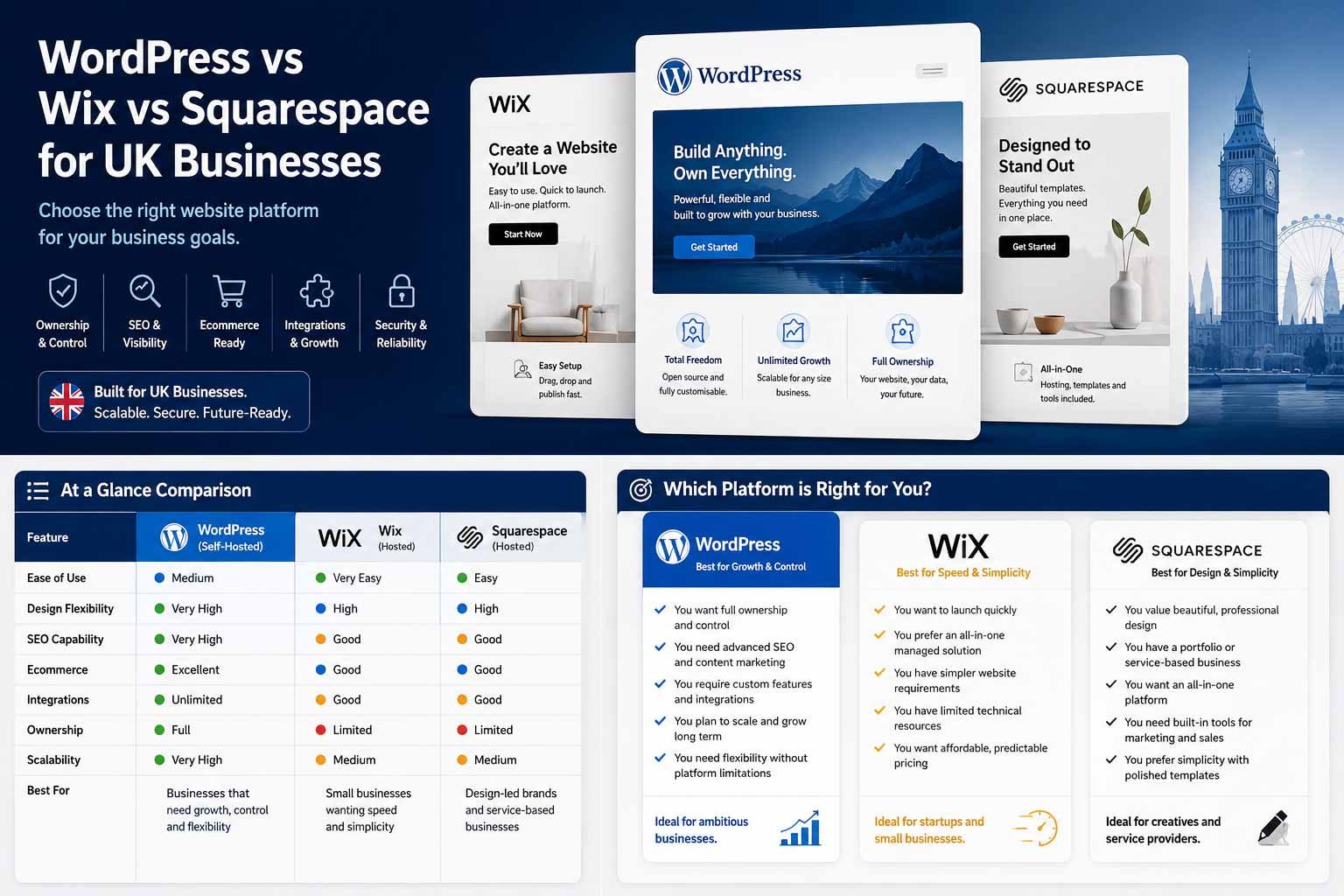
The most useful comparison is not which editor has the longest feature list. It is which operating model matches the people, processes and systems behind the website.
Managed Simplicity
Best considered when fast setup, built-in business tools and low technical responsibility matter more than hosting independence.
- Strong DIY route
- Centralised hosting and updates
- More platform dependency
Controlled Visual Consistency
Best considered when brand presentation, straightforward content and a managed editing environment are the main priorities.
- Polished design system
- Lower maintenance burden
- More limited extensibility
Control and Integration
Best considered when content depth, SEO architecture, custom integrations and hosting choice justify active management.
- Broad customisation
- Hosting portability
- Named maintenance owner required
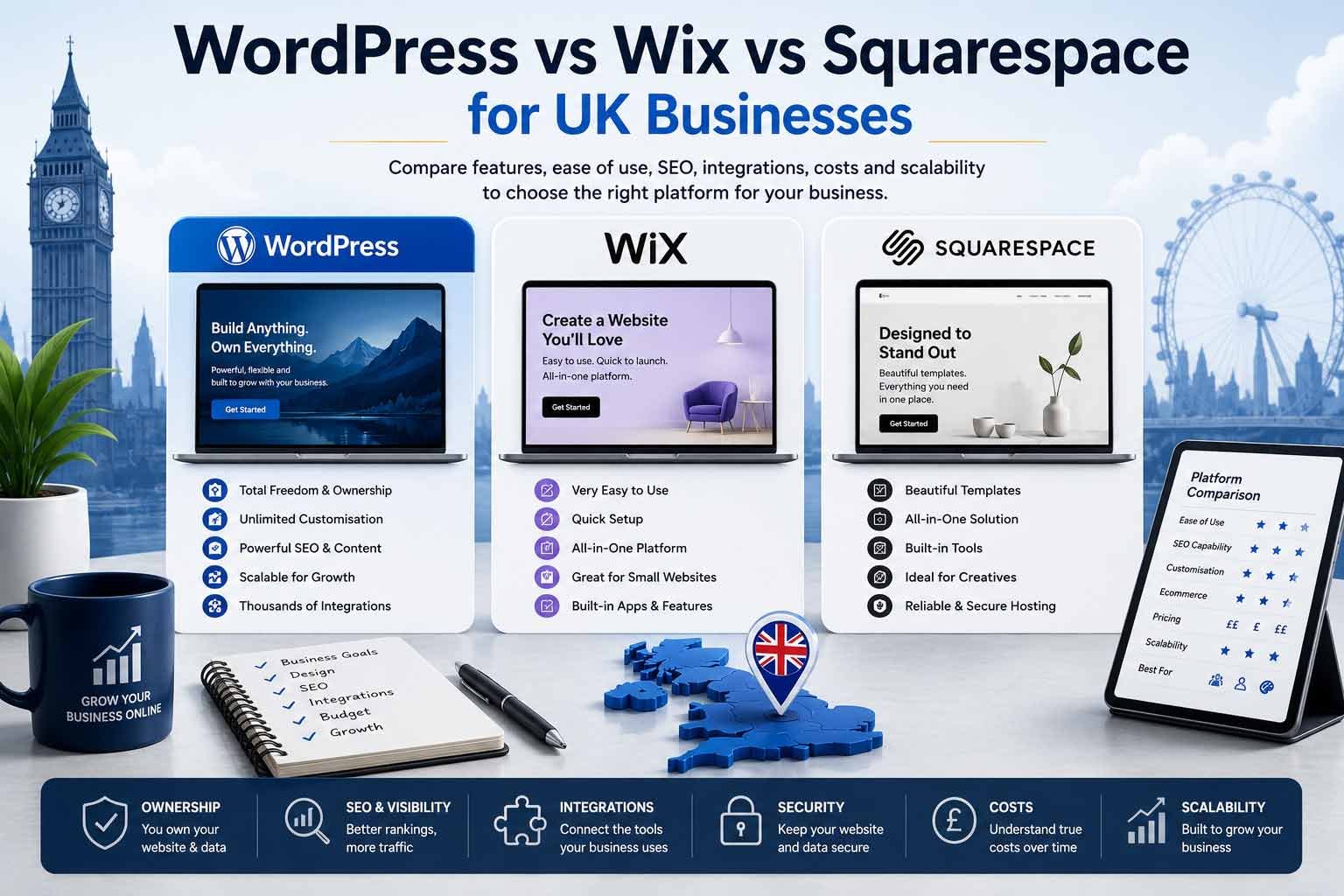
Find Your Best Starting Platform
Answer six practical questions to identify the operating model most likely to fit your current requirements. Use the result as a starting point, then confirm the choice against your detailed scope, budget and existing systems.
Which Platform Is Best?
| Business Requirement | Recommended Starting Point | Why |
|---|---|---|
| Fastest DIY launch | Wix | Guided setup, managed hosting and broad built-in business tools |
| Design-led portfolio or simple service site | Squarespace | Strong visual consistency and an integrated editing experience |
| Search-led service business | Self-hosted WordPress | Greater control over content structure, metadata, schema, redirects and integrations |
| Content-heavy publication | Self-hosted WordPress or WordPress.com | Strong publishing model, categories, users and extensibility |
| Simple small online store | Wix or Squarespace | Managed commerce with lower technical responsibility |
| Complex content and WooCommerce store | Self-hosted WordPress | Greater flexibility, but higher management and extension complexity |
| Large specialist ecommerce operation | Consider Shopify or another commerce platform | Ecommerce requirements may exceed the ideal scope of all three options |
| CRM-integrated lead-generation website | Self-hosted WordPress | More implementation routes for custom forms, APIs, automation and attribution |
| Owner wants no technical maintenance | Wix, Squarespace or managed WordPress.com | Hosting and platform updates are handled centrally |
| Business wants hosting choice and deeper portability | Self-hosted WordPress | The website can move between compatible hosting providers |
| Temporary campaign or early-stage validation | Wix or Squarespace | Lower setup burden and faster launch |
| Customer portal or bespoke application | Specialist platform assessment | A marketing-site builder may not be the correct foundation |
Choose Wix when the main priorities are speed, simplicity and an all-in-one managed service.
Choose Squarespace when visual presentation, brand consistency and a controlled editing experience matter most.
Choose self-hosted WordPress when the website must support deeper content, SEO, integrations, data ownership choices and long-term customisation—and the business accepts the need for maintenance.
Choose none of them automatically when the project is primarily an ecommerce platform, customer portal, marketplace or bespoke application.
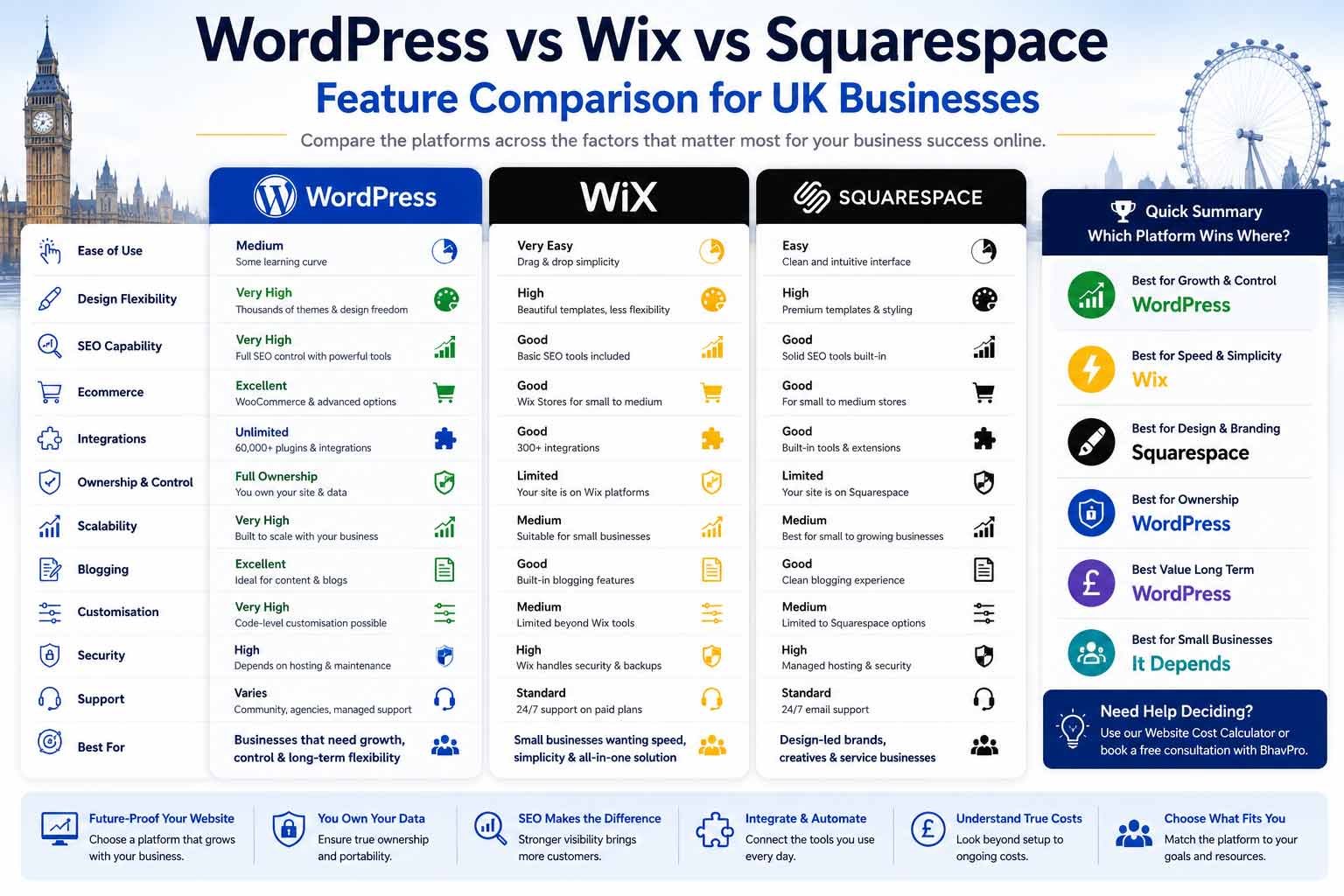
WordPress, Wix and Squarespace at a Glance
| Criterion | Self-Hosted WordPress | Wix | Squarespace |
|---|---|---|---|
| Operating model | Open-source software on chosen hosting | Fully hosted proprietary platform | Fully hosted proprietary platform |
| Initial ease | Moderate | High | High |
| Ongoing technical responsibility | Medium to high unless managed | Low | Low |
| Design freedom | Very high | High within Wix | Strong but more controlled |
| Content flexibility | Very high | Good | Good |
| SEO control | Very high | Good | Good |
| Hosting choice | Yes | No | No |
| Extension ecosystem | Very large | Wix App Market | Smaller integrated-extension model |
| Custom integration potential | Very high | Good through platform tools and APIs | Moderate, depending on supported integrations |
| Content portability | Strong, but implementation-dependent | Selected data and account transfers; full off-platform site portability is limited | Selected content export; design and some content types do not fully transfer |
| Maintenance | Owner or provider responsibility | Platform managed | Platform managed |
| Best fit | Growth, content, SEO and integrations | DIY and managed small-business sites | Design-led and content-led managed sites |
| Main trade-off | More responsibility and quality variation | Platform dependency and portability limitations | Less extensibility and portability than self-hosted WordPress |
What Is Self-Hosted WordPress?
WordPress is open-source content-management software. A self-hosted implementation is installed on a hosting platform chosen by the owner or supplier.
WordPress separates content, presentation and functionality through:
- Core software
- Themes
- Plugins
- Hosting
- Database
- Media
- Custom code
- APIs
The official WordPress ecosystem contains thousands of themes and tens of thousands of plugins. This breadth is a major strength, but it also means implementation quality varies.
Where WordPress Is Strong
- Complex page and content structures
- Multiple service pages
- Blogs, resources and case studies
- Search-led architecture
- Custom metadata and schema
- Redirect and canonical control
- CRM and workflow integration
- WooCommerce
- Membership and gated content
- Multilingual sites
- Custom post types
- Hosting choice
- Developer access
- Data export
- Long-term extensibility
Where WordPress Requires More Work
- Hosting selection
- Updates
- Backups
- Security
- Plugin governance
- Performance
- Compatibility testing
- Support
- Licence renewals
- Staging
- Technical troubleshooting
A well-managed WordPress website can be reliable and fast. A poorly assembled WordPress website can become slow, insecure or difficult to maintain.
The platform creates flexibility; it does not guarantee quality.
Who Should Consider WordPress?
- B2B service businesses
- Multi-service companies
- Organisations relying on organic search
- Publishers and resource-led brands
- Businesses needing CRM or API integration
- Companies planning significant content growth
- Owners wanting hosting flexibility
- Businesses requiring custom workflows
- Teams with a managed technical partner
Who May Not Need WordPress?
- A solo professional needing three simple pages
- A temporary event site
- A small portfolio with no integration
- An owner wanting zero maintenance involvement
- A business unwilling to budget for updates and support
What Is Wix?
Wix is a proprietary, fully hosted website platform. The subscription combines the editor, hosting, infrastructure and plan-based business functionality.
Wix has invested heavily in:
- Drag-and-drop editing
- AI-assisted setup
- Templates
- Online bookings
- Ecommerce
- SEO tools
- Marketing tools
- Forms
- Automations
- App integrations
- Business-management features
Where Wix Is Strong
- Fast setup
- Beginner accessibility
- Managed hosting
- Centralised updates
- Visual editing
- Built-in business tools
- Online bookings
- Small ecommerce stores
- Forms and automations
- Support through one platform
- No separate hosting management
- Free starting option for testing
Where Wix Has Trade-Offs
- The website operates within Wix’s hosting and platform environment
- Moving the full design and implementation to another platform is not equivalent to moving a self-hosted WordPress installation
- Advanced customisation must follow Wix’s supported methods
- Apps and premium functionality can increase recurring cost
- Complex content and operational integrations may require careful technical assessment
- A visually flexible editor can produce inconsistent layouts without design controls
Wix allows site ownership to be transferred between Wix accounts, and domains can be transferred. Moving the complete website to a different platform normally requires the design and functionality to be rebuilt.
Who Should Consider Wix?
- New small businesses
- Solo service providers
- Early-stage validation
- Owners building the website themselves
- Appointment-led businesses
- Simple online stores
- Businesses preferring one managed supplier
- Teams without technical support
Who May Outgrow Wix?
- Businesses requiring extensive custom data models
- Large content architectures
- Complex two-way integrations
- Bespoke user permissions
- Organisations requiring hosting independence
- Teams planning a highly specialised platform
Outgrowing Wix is not inevitable. The risk depends on whether future requirements exceed the platform’s supported model.
What Is Squarespace?
Squarespace is a proprietary, fully hosted website and commerce platform known for visual presentation, structured templates and an integrated editing experience.
Its current platform includes:
- Website design
- Hosting
- Content management
- Blogging
- Ecommerce
- Scheduling integrations
- Email and marketing options
- Analytics
- SEO controls
- AI-assisted content and description tools
- Domain management
Where Squarespace Is Strong
- Polished design starting points
- Consistent visual system
- Portfolio presentation
- Blogging
- Service-business sites
- Content-led brands
- Simple ecommerce
- Managed hosting
- Lower technical responsibility
- Integrated platform support
Where Squarespace Has Trade-Offs
- Less extensibility than self-hosted WordPress
- Some advanced functionality depends on supported integrations or custom-code boundaries
- Complete migration of the visual design to another platform is not available
- Exported content is limited by content type and destination
- Complex portals and operational workflows may exceed the ideal use case
- Teams requiring unusual content models may find the structure restrictive
Squarespace supports export of selected content and commerce data. Its documentation notes that layouts, design, fonts and some content cannot be transferred directly to another system.
Who Should Consider Squarespace?
- Photographers
- Designers
- Creative studios
- Consultants
- Restaurants
- Event providers
- Personal brands
- Content-led small businesses
- Simple service companies
- Smaller ecommerce stores
Who May Outgrow Squarespace?
- Businesses requiring deep CRM automation
- Highly customised content structures
- Complex permissions
- Advanced search and filtering
- Bespoke quoting
- Large operational portals
- Unusual commerce workflows
- Hosting independence
Which Platform Is Easiest to Manage?
Wix
Wix is generally the easiest starting point for a complete beginner. The platform guides the user through setup, and the editor allows substantial visual control without separate hosting or plugin management.
Advantage: The business can begin quickly.
Risk: Freedom can create inconsistent spacing, typography and mobile presentation if the owner does not follow a design system.
Squarespace
Squarespace provides a more controlled visual environment. This can make it easier to maintain a polished design without making as many low-level choices.
Advantage: The platform encourages consistency.
Risk: A user may encounter a limitation when attempting a layout, integration or content model outside the platform’s intended patterns.
WordPress
WordPress ease depends heavily on the implementation.
A professionally configured WordPress site using a controlled theme, reusable blocks or a disciplined page builder can be straightforward to update. A site with many plugins, several builders and unclear templates can be confusing.
Advantage: The editorial system can be shaped around the business.
Risk: The owner may inherit a technically complex installation with no documentation or governance.
Ease-of-Use Verdict
- Best for an owner building alone: Wix
- Best for design consistency: Squarespace
- Best for a tailored managed editing system: WordPress
- Worst outcome: Any platform implemented without a content model and handover process
Which Platform Is Best for Design?
Wix Design
Wix provides broad drag-and-drop freedom and a large template ecosystem. It is suitable when the owner wants fast visual experimentation and standard business components.
Squarespace Design
Squarespace is strongest when the business wants elegant layouts, typography, portfolio presentation and a restrained visual system.
WordPress Design
WordPress offers the broadest design range because it can use block themes, bespoke themes, Astra, Elementor, other builders, custom components or fully custom development.
This flexibility can create an excellent tailored system or an inconsistent collection of plugins and styles.
Design Verdict
- Best DIY visual freedom: Wix
- Best controlled visual polish: Squarespace
- Best maximum customisation: WordPress
- Best design quality in practice: The platform with the strongest design discipline and implementation
Is WordPress Better Than Wix or Squarespace for SEO?
All three platforms can support search visibility.
A platform does not rank a website automatically. Search performance depends on:
- Demand
- Content quality
- Intent matching
- Technical implementation
- Internal links
- Authority
- User experience
- Competition
- Maintenance
- Measurement
Wix SEO
Wix currently provides built-in SEO tools that include elements such as:
- Metadata management
- SEO setup guidance
- Sitemaps
- Redirects
- Structured data
- Robots controls
- Image handling
- Integrations with analytics and search tools
Wix can be entirely adequate for a local or small service business with a manageable content structure.
Squarespace SEO
Squarespace includes SEO-friendly platform features and controls for:
- Titles
- Descriptions
- Clean indexing
- Sitemaps
- Image text
- Social sharing
- Redirects
- Mobile presentation
- Structured page types
Squarespace also provides official SEO checklists and content guidance.
WordPress SEO
Self-hosted WordPress provides deeper control through:
- Themes
- SEO plugins
- Custom metadata
- Schema
- Templates
- Redirects
- Canonicals
- Sitemaps
- Robots rules
- Content types
- Programmatic internal linking
- Server and hosting configuration
- Custom code
The advantage is control, not an automatic ranking bonus.
SEO Verdict
- Simple local or brochure website: All three can be suitable
- Large service architecture or content programme: WordPress usually provides greater flexibility
- Advanced technical SEO requirements: WordPress generally provides deeper access
- Poor content and weak authority: No platform solves the problem
- Existing ranking migration: The process matters more than the platform name
A business should not move from Wix or Squarespace only because someone claims Google “prefers WordPress.” Google evaluates the website’s usefulness and implementation, not a universal preferred builder.
Which Platform Is Best for Ongoing Content?
WordPress
WordPress remains strong for:
- Categories and tags
- Multiple authors
- Editorial workflows
- Custom post types
- Large archives
- Related content
- Resource libraries
- Case studies
- Content integrations
- Advanced internal linking
Squarespace
Squarespace is suitable for standard blogs, visual articles, news, portfolios, events, newsletters and content-led service brands. It offers a cleaner managed experience but less scope for unusual editorial systems.
Wix
Wix provides blogging and content features suitable for many small businesses. It becomes less attractive when the business requires a highly tailored content model or complex publishing workflow.
Content Verdict
- Best for deep or scalable publishing: WordPress
- Best for visually consistent small-scale publishing: Squarespace
- Best for simple business content with easy setup: Wix
WordPress, Wix or Squarespace for an Online Store?
Wix Ecommerce
Wix can suit:
- Small product ranges
- Service payments
- Bookings
- Straightforward subscriptions
- Simple multichannel selling
- Businesses wanting a managed platform
Squarespace Ecommerce
Squarespace can suit:
- Design-led products
- Creative brands
- Small catalogues
- Digital products
- Appointments
- Simple memberships
- Businesses already using Squarespace content
WordPress and WooCommerce
WooCommerce can support:
- Complex catalogues
- Tailored checkout
- Custom product types
- Trade pricing
- Subscriptions
- Integrations
- Content-rich commerce
- Custom reporting
- Unusual fulfilment models
The trade-off is greater technical responsibility and a greater risk of extension conflicts or escalating maintenance.
Ecommerce Verdict
- Simple managed store: Wix or Squarespace
- Content-rich or highly customised commerce: WordPress and WooCommerce may fit
- Large dedicated ecommerce operation: Shopify, BigCommerce or another specialist platform may be more appropriate
- Marketplace or bespoke commerce: Formal discovery is required
Do not select WordPress simply because WooCommerce is flexible. A business with limited technical support may receive better value from a more managed commerce platform.
Which Platform Is Best for Connected Business Systems?
Wix
Wix includes native business functions and automation. It can support forms, bookings, contacts, email, workflows, app integrations and platform APIs. This can be efficient when the required journey already fits the Wix ecosystem.
Squarespace
Squarespace can connect with email platforms, scheduling, forms, commerce, analytics, selected third-party tools and automation connectors. It is suitable for straightforward integrations but may require workarounds when the workflow is highly specialised.
WordPress
WordPress can connect through:
- Form plugins
- CRM plugins
- Webhooks
- Automation platforms
- Custom APIs
- Server-side code
- Database integration
- Custom authentication
- WooCommerce hooks
- Third-party services
WordPress normally offers the broadest range of connection methods, but every integration adds governance, security, testing and maintenance.
Integration Verdict
- Built-in simple workflow: Wix may be fastest
- Standard service-business integrations: All three may work
- Complex CRM and operational workflow: WordPress often provides more flexibility
- Bespoke portal or internal application: A standard marketing CMS may not be the right foundation
BhavPro’s platform review should begin with the workflow, not the preferred software.
Do You Own a Wix, Squarespace or WordPress Website?
“Ownership” contains several separate questions:
- Who owns the domain?
- Who owns the written content?
- Who owns the images?
- Who owns the design?
- Who owns custom code?
- Who controls the account?
- Can the site move to another host?
- Can content be exported?
- Can the design be reproduced elsewhere?
- What happens when the subscription ends?
Self-Hosted WordPress
With the correct contract and account setup, the business can control:
- Domain
- Hosting
- Database
- Files
- Content
- Plugins and themes subject to their licences
- Administrator accounts
A WordPress site can normally move to another compatible host, although proprietary themes, page builders and licensed plugins can still create dependency.
Wix
A Wix site can be transferred to another Wix account, and a Wix-managed domain can be transferred. However, the complete site cannot simply be exported and hosted as the same editable Wix site on another provider.
Content and commerce data may have specific export options, but a move to another platform generally requires a rebuild.
Squarespace
Squarespace provides export options for selected content and commerce records. Its guidance notes that layout, design, fonts and certain content do not transfer completely.
Moving to another platform therefore normally involves rebuilding the presentation and unsupported functionality.
Ownership Verdict
- Best hosting portability: Self-hosted WordPress
- Simplest managed-account transfer: Wix or Squarespace within their own ecosystems
- Best practical ownership: The platform where the business controls the domain, accounts, content, billing and supplier contract
- Main risk: Letting a designer register the domain and platform entirely under their own account
Platform portability should be assessed before launch—not when the business has already decided to leave.
Who Is Responsible for Keeping the Website Running?
Wix and Squarespace
The platform provider manages the core hosting environment, platform updates and infrastructure.
The business remains responsible for:
- Account security
- User permissions
- Content
- Privacy
- Legal obligations
- Third-party apps
- Staff access
- Correct configuration
Self-Hosted WordPress
The website owner or managed provider handles:
- Hosting
- WordPress updates
- Plugin updates
- Theme updates
- Backups
- Malware monitoring
- Firewall configuration
- Performance
- Staging
- Compatibility
- Recovery
Maintenance Verdict
- Lowest technical responsibility: Wix and Squarespace
- Most control: Self-hosted WordPress
- Best option for a non-technical owner: A managed platform or genuinely managed WordPress service
- Highest risk: WordPress with no named maintenance owner
WordPress security should not be assessed only by the software name. Hosting, plugins, permissions, updates and operational practice matter.
Which Platform Is Fastest?
No platform is automatically fastest in every implementation.
Performance depends on:
- Template
- Page layout
- Images
- Fonts
- Video
- Third-party scripts
- Tracking
- Apps or plugins
- Hosting
- Caching
- Code quality
- User location
- Content volume
Wix and Squarespace control their infrastructure and can optimise common platform components centrally. The owner has less server-level control but also less technical responsibility.
WordPress can be extremely fast with strong hosting, an efficient theme, disciplined plugin use, caching and controlled media. It can also be slow when assembled without governance.
Performance Verdict
Choose based on an implementation and measurement plan, not a platform marketing claim.
Ask:
- What will be tested?
- Which third-party scripts are necessary?
- Who monitors performance after launch?
- What happens when new content and apps are added?
Is Any Platform Automatically Accessible?
No platform guarantees that the finished website meets an accessibility standard.
Accessibility depends on:
- Theme or template
- Content structure
- Heading order
- Colour contrast
- Alternative text
- Form labels
- Focus behaviour
- Keyboard interaction
- Third-party apps
- Custom code
- Ongoing content editing
A strong platform can still produce an inaccessible website.
The supplier should explain whether the work includes accessibility-conscious design, automated testing, manual testing or formal audit.
Does Wix, Squarespace or WordPress Make a Site GDPR Compliant?
No platform automatically makes a business compliant.
The organisation must consider:
- What data is collected
- Why it is collected
- Lawful basis
- Consent
- Cookies
- Analytics
- Third-party apps
- International transfers
- Retention
- Security
- Data-subject rights
- Supplier agreements
Wix and Squarespace provide managed platform features, but the owner remains responsible for configuration and business use. WordPress provides flexibility over hosting, plugins and consent systems, but that flexibility creates more implementation responsibility.
Platform features support a compliance process. They do not replace legal review.
Where Do You Get Help?
Wix
Support is centred on the Wix platform and its official help environment. This can simplify accountability for platform-level problems.
Squarespace
Squarespace provides official support for the hosted service, editor and platform functions.
WordPress
Self-hosted WordPress has no single universal support provider.
Support may come from:
- Hosting company
- Theme developer
- Plugin developer
- WordPress community
- Website agency
- Managed service provider
This provides specialist choice, but troubleshooting sometimes requires identifying which supplier owns the issue.
Support Verdict
- Single-platform support: Wix or Squarespace
- Choice of specialist providers: WordPress
- Best practical arrangement: A written support model naming who handles hosting, content, security, plugins and integrations
Which Platform Is Cheapest?
The lowest subscription is not necessarily the lowest website cost.
Wix and Squarespace Costs
Possible costs include:
- Website plan
- Domain renewal
- Business email
- Apps or extensions
- Ecommerce plan
- Transaction fees
- Scheduling
- Email marketing
- Professional setup
- Content
- Migration
WordPress Costs
Possible costs include:
- Hosting
- Domain
- Theme or builder
- Plugins
- Development
- Design
- Maintenance
- Support
- Security
- Backups
- Content
- Migration
Cost Verdict
- Lowest DIY entry cost: Usually Wix, WordPress.com or another hosted builder, depending on current offers
- Most predictable managed cost: Wix or Squarespace
- Broadest possible cost range: Self-hosted WordPress
- Most important comparison: Three-to-five-year total ownership, including the owner’s time and eventual migration
For current UK project-cost ranges, use the separate How Much Does a Website Cost in the UK? guide. For a personalised estimate, use the Website Cost Calculator.
How Should AI Features Affect the Decision?
All three ecosystems now include or support AI-assisted functionality.
AI may help with:
- Initial layouts
- Draft copy
- Image generation
- Metadata
- Product descriptions
- Content ideas
- Support
- Setup guidance
AI does not remove the need for:
- Accurate positioning
- Evidence
- Original expertise
- Information architecture
- Legal review
- Accessibility
- Brand decisions
- Migration planning
- Conversion design
- Human quality control
Choose the platform based on the website’s long-term requirements, not the novelty of the current AI setup wizard.
How Difficult Is It to Change Platforms Later?
Wix to Another Platform
The domain and selected data can be moved, but the full Wix site design and functionality generally need to be rebuilt on the new platform.
Squarespace to Another Platform
Selected content and commerce records can be exported, but the design, layouts and unsupported content need to be recreated.
WordPress to Another Host
A self-hosted WordPress installation can usually move between compatible hosting environments with its database and files, subject to licences and technical dependencies.
WordPress to Another Platform
Content may be exported, but a move to Wix, Squarespace or another CMS still involves rebuilding design and unsupported functionality.
Migration Verdict
Every platform creates some switching cost.
Before choosing, record:
- Export options
- Domain ownership
- Content ownership
- Product and customer exports
- Design dependency
- App dependency
- Email dependency
- URL structure
- Redirect capability
- Analytics history
- Contractual terms
The best migration is one planned before the first build.
Score the Platform Against Your Business Requirements
Use a score from 1 to 5, where 5 is strongest for the requirement.
Use these scores to organise your priorities. They are not independent product-test results, and one essential requirement can outweigh the total score.
| Requirement | Self-Hosted WordPress | Wix | Squarespace |
|---|---|---|---|
| Beginner DIY setup | 2 | 5 | 4 |
| Managed hosting convenience | 2 | 5 | 5 |
| Design consistency without technical help | 3 | 4 | 5 |
| Maximum design freedom | 5 | 4 | 3 |
| Large content architecture | 5 | 3 | 3 |
| Advanced SEO control | 5 | 4 | 4 |
| Hosting portability | 5 | 1 | 1 |
| Standard business tools | 4 | 5 | 4 |
| Complex CRM and API integration | 5 | 3 | 2 |
| Simple ecommerce | 4 | 4 | 4 |
| Complex ecommerce | 4 | 3 | 2 |
| Low technical maintenance | 2 | 5 | 5 |
| Custom user roles and workflows | 5 | 2 | 2 |
| Predictable platform support | 3 | 5 | 5 |
| Long-term customisation | 5 | 3 | 2 |
How to Use the Matrix
- Mark the five requirements most important to the business.
- Increase their weighting.
- Identify any non-negotiable requirement.
- Consider the team responsible for maintenance.
- Review the exit and migration route.
- Test the recommendation against a three-year plan.
A platform with the highest total score can still be unsuitable if it fails one essential requirement.
Which Platform Fits Different UK Businesses?
Sole Trader or New Service Business
Likely fit: Wix or Squarespace.
Choose Wix when bookings, forms and fast DIY setup matter.
Choose Squarespace when visual identity and portfolio presentation matter.
Choose WordPress when the business already has a serious content or search strategy.
Local Service Business
Likely fit: Wix, Squarespace or WordPress.
A small service business can rank and generate leads on any of the three.
Choose WordPress when the plan includes:
- Multiple services
- Local landing pages based on genuine relevance
- Case studies
- Resources
- CRM integration
- Long-term SEO
Choose Wix or Squarespace when the site is compact and the owner prioritises ease.
Consultant or Professional Adviser
Likely fit: Squarespace or WordPress.
Squarespace suits a focused brand, insights and simple enquiry journey.
WordPress suits deeper service architecture, resources, lead magnets, CRM and organic content growth.
Creative Portfolio
Likely fit: Squarespace.
Wix may suit users wanting greater layout freedom.
WordPress is appropriate when the portfolio also needs complex filtering, publishing or integrations.
B2B Multi-Service Company
Likely fit: WordPress.
The business may need:
- Distinct service ownership
- Sector pages
- Case studies
- Lead capture
- CRM
- Downloads
- Search-led content
- Measurement
- Ongoing expansion
A managed WordPress implementation can provide flexibility without asking internal users to manage the technical layer.
Appointment-Led Business
Likely fit: Wix or Squarespace.
Built-in or tightly integrated scheduling can reduce implementation complexity.
Choose WordPress when appointment data must connect with a specialised CRM or workflow.
Small Online Store
Likely fit: Wix or Squarespace for simplicity; WooCommerce for greater customisation.
The decision depends on products, variations, shipping, subscriptions, trade pricing, integrations, content and fulfilment.
Content Publisher
Likely fit: WordPress.
WordPress is generally stronger for large archives, categories, users, custom content types and editorial growth.
Membership Business
Likely fit: Platform-specific assessment.
Squarespace or Wix may work for simple memberships. WordPress may suit more custom membership workflows but adds technical responsibility. A dedicated membership or learning platform may be more appropriate.
Customer Portal or Marketplace
Likely fit: Formal discovery before platform selection.
Do not choose a familiar page builder before defining user roles, permissions, data, security, workflows, integrations, audit requirements and scale.
Do Not Choose a Platform for the Wrong Reason
“It Is Free”
A free plan may not include the domain, storage, ecommerce, plugins, support or business functionality required.
“Google Prefers It”
Google does not universally rank one builder simply because of its brand name.
“The Template Looks Perfect”
Content, conversion and maintainability matter after the first impression.
“My Designer Only Uses It”
The platform should follow the requirement, not only the supplier’s existing skill set.
“It Includes AI”
AI generation does not solve positioning, proof, migration or operational integration.
“We Can Move Later”
Moving often requires design and functionality to be rebuilt.
“It Requires No Maintenance”
Managed platforms reduce technical maintenance, but content, permissions, privacy, integrations and business information still need ownership.
Platform Selection Checklist
Business
- What must the website achieve?
- How valuable is an enquiry or sale?
- Is the website mainly for credibility, leads, content, ecommerce or operations?
- How quickly must it launch?
- What is the three-year plan?
Content
- How many services, products and audiences exist?
- Will the business publish regularly?
- Are case studies and resources required?
- Will several people edit the site?
- Is multilingual content required?
Search
- Is organic search a primary acquisition channel?
- Are multiple service or location queries involved?
- Are existing rankings being migrated?
- Is advanced schema or technical SEO required?
Design
- Is template consistency enough?
- Is a bespoke brand experience required?
- Who will maintain design quality after launch?
Functionality
- Are bookings, payments, accounts or memberships needed?
- Is advanced filtering required?
- Will the website contain calculators or portals?
Integrations
- Which CRM is used?
- What should happen after a form submission?
- Are email, VoIP, accounting or support systems involved?
- Are APIs available?
Ownership
- Who controls the domain?
- Who controls the platform account?
- What content can be exported?
- Can the website move to another host?
- What licences remain valid?
Maintenance
Who installs updates?
Who monitors security?
Who handles backups?
Who fixes integration failures?
What is the support response time?
What is the first-year cost?
What is the expected three-year cost?
Which apps, plugins and licences renew?
What does migration cost later?
How BhavPro Chooses a Website Platform
BhavPro starts with five questions.
1. What Is the Website Responsible For?
A website that only confirms credibility has different needs from one generating leads, selling products or supporting customers.
2. What Must It Connect With?
The CRM, forms, booking, analytics, telephone, email and operational workflows can determine the appropriate platform.
3. Who Will Manage It?
A platform is unsuitable if the team cannot maintain it or fund appropriate support.
4. What Must Remain Flexible?
Content, hosting, data, integrations and design have different portability requirements.
5. What Happens in Three Years?
The decision should account for:
- More services
- New locations
- Content growth
- Integration
- Staffing
- Migration
- Ownership
- Acquisition or sale
- Regulatory needs
BhavPro’s Typical Recommendation
For a Leicester or UK service business needing search-led pages, case studies, CRM-ready forms, analytics and future integration, BhavPro will often recommend a professionally managed self-hosted WordPress website.
For a simple owner-managed site with limited content and no complex integration, Wix or Squarespace may be more proportionate.
The recommendation is based on the business requirement, not a rule that every company needs WordPress.
WordPress vs Wix vs Squarespace FAQs
Which is better: WordPress, Wix or Squarespace?
There is no universal winner. Wix is usually easiest for a beginner. Squarespace is strong for polished design and managed simplicity. Self-hosted WordPress provides greater control over content, SEO, hosting and integrations but requires maintenance.
Is WordPress better than Wix for SEO?
WordPress generally provides deeper technical and content control. Wix has capable built-in SEO tools and can rank well for many small-business queries. Search performance depends more on content, intent, implementation, authority and competition than the platform name alone.
Is Squarespace better than Wix?
Squarespace often provides stronger visual consistency and polished templates. Wix offers more drag-and-drop freedom and a wider set of built-in business tools. The better choice depends on whether the user values controlled design or broader visual and functional flexibility.
Is Wix good for a UK small business?
Yes. Wix can be suitable for a small service business, appointment-based business, simple store or early-stage company that wants managed hosting and easy editing. It becomes less suitable when unusual data, integrations, hosting independence or bespoke workflows are essential.
Is Squarespace good for a business website?
Yes. Squarespace is suitable for many consultants, creative companies, restaurants, personal brands and smaller service businesses. It is less suited to highly customised operational systems or complex content models.
What is the difference between WordPress.com and WordPress.org?
WordPress.com is a hosted service with plan-based features and managed infrastructure. WordPress.org refers to the open-source software installed on hosting chosen by the owner. Self-hosted WordPress provides greater hosting control but requires maintenance.
Is WordPress free?
The software is open source, but a business website still needs hosting, domain, design, development, themes, plugins, maintenance and support. The total cost can be lower or higher than Wix or Squarespace depending on the implementation.
Which platform is cheapest?
Wix, Squarespace or WordPress.com can provide a low-cost DIY route. Self-hosted WordPress has the broadest cost range because it can support both simple and highly customised projects. Compare total ownership rather than only the first subscription.
Which platform is best for ecommerce?
Wix and Squarespace can suit straightforward small stores. WordPress with WooCommerce provides greater customisation but requires more management. A larger ecommerce operation may be better served by Shopify or another dedicated commerce platform.
Which platform is best for blogging?
WordPress is generally the strongest for large-scale publishing, custom content types and editorial growth. Squarespace is effective for visually polished blogs and small content programmes. Wix is suitable for straightforward business blogging.
Can a Wix website be moved to WordPress?
The domain and selected content or data can be moved, but the Wix design and implementation normally need to be rebuilt in WordPress. Redirects and existing search performance should be considered before migration.
Can a Squarespace site be moved to WordPress?
Squarespace can export selected content for import into WordPress, but the complete design, layouts and all content types do not transfer. The new site will usually require design and functionality to be rebuilt.
Can a WordPress website move to another host?
A self-hosted WordPress site can normally move between compatible hosting providers using its files and database. Licences, proprietary hosting features and technical dependencies should be reviewed first.
Is WordPress secure?
WordPress can be secure when hosting, updates, plugins, permissions, backups and monitoring are managed correctly. Its flexibility means the owner or provider must maintain the installation. Wix and Squarespace centralise more of that responsibility.
Which platform is easiest to update?
Wix is usually easiest for complete beginners. Squarespace provides a controlled visual editor. WordPress can be easy when professionally configured, but poor implementations can be confusing.
Which platform gives the best ownership?
Self-hosted WordPress normally provides the greatest hosting and implementation control. Wix and Squarespace allow account and domain control but operate within proprietary hosting environments. Contracts and account ownership matter on every platform.
Can all three platforms rank on Google?
Yes. All can be indexed and can rank. The result depends on whether the website answers search intent, provides useful content, earns authority and is implemented correctly.
Can Wix or Squarespace connect to a CRM?
Yes, depending on the CRM and workflow. Native integrations, apps, automation services, APIs and webhooks may be available. More specialised processes require technical assessment.
Which platform is best for a Leicester service business?
A compact owner-managed site may suit Wix or Squarespace. A business planning multiple service pages, local search content, CRM integration, case studies and ongoing SEO may receive more flexibility from managed WordPress.
How do I get an independent platform recommendation?
Document the required pages, content, ecommerce, integrations, ownership expectations, internal capability, budget and three-year plan. BhavPro can then assess the operating model before recommending a build.
Practical Experience Behind This Comparison
Bhav Giva’s guidance draws on 15+ years across website delivery, SEO-led growth, CRM architecture, telecom operations and workflow improvement. Historical work included increasing monthly website traffic from approximately 25,000 to 120,000 and connecting website journeys with sales, support and operational systems.
What these results mean: they demonstrate relevant delivery experience, not platform test scores or guaranteed outcomes. Your result will depend on strategy, implementation, competition and ongoing management.
Executive Decision Summary
- Choose Wix when an owner wants a fast, managed DIY route with broad built-in tools and limited technical responsibility.
- Choose Squarespace when visual consistency, straightforward content and a controlled managed environment are the strongest priorities.
- Choose managed self-hosted WordPress when content depth, SEO architecture, CRM integration, hosting choice and future customisation justify ongoing maintenance.
- Choose a specialist platform assessment when the project is primarily a portal, marketplace, complex ecommerce operation or bespoke application.
- Plan the exit before launch: domain control, export options, URL structure, data portability and supplier ownership should be agreed before the build begins.
Choose the Platform Around the Business—Not the Sales Demo
BhavPro can review your pages, content, ecommerce, integrations, ownership expectations, internal capability and three-year plan before recommending WordPress, Wix, Squarespace or a specialist alternative.
Official Platform Information and Evaluation Approach
This guide compares operating responsibility, content capability, integrations, portability and likely long-term fit. Platform features and plan structures change, so commercial terms should always be checked directly before purchase.
- WordPress.org Features — open-source publishing and platform capabilities.
- WordPress Export Documentation — content export and migration information.
- Wix Export and External Hosting Guidance — official platform portability limitations.
- Wix Site Transfer Guidance — transferring ownership within Wix.
- Squarespace Export Guidance — supported content export and migration boundaries.
- Squarespace SEO Checklist — official search configuration guidance.
BhavPro designs and supports WordPress websites, but this comparison does not automatically recommend WordPress. Wix or Squarespace may be more proportionate when a business needs a straightforward managed website without extensive integrations, content architecture or technical control.