
Technical Training Services for UK Businesses
BhavPro provides practical technical training for UK business teams using AI, CRM, VoIP, automation and reporting systems. Training is tailored to participant roles, existing tools and business workflows, combining explanation, guided demonstrations, hands-on exercises and operational guidance so employees can use technology more confidently, consistently and safely in everyday work.
15+ Years Cross-Functional Experience
Remote & Onsite Options
Role-Based Training
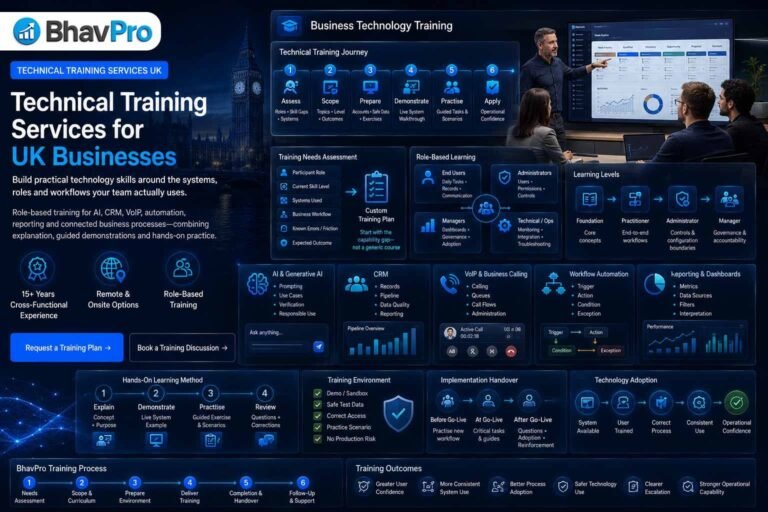
Technical Training Services at a Glance
BhavPro designs practical training around the systems, roles and workflows a team actually uses. The objective is not to overwhelm participants with features; it is to improve the specific knowledge and operating confidence needed for day-to-day work.
Role-based curriculum
Training is scoped around what participants need to do in their role rather than a generic vendor feature list.
Hands-on learning
Demonstrations are combined with guided exercises, scenarios and practical operating guidance.
Business-system focus
Core areas include AI, CRM, VoIP, automation, reporting and connected business processes.
Implementation handover
Training can support adoption after a system or workflow has been implemented and tested.
What Are Technical Training Services?
Technical training services help employees use business systems more effectively, safely and consistently. BhavPro focuses on practical skills around technologies it advises on and implements, with content tailored to the organisation's current tools, workflows, user roles and operating requirements.
Training focuses on capability
Participants learn how to perform agreed tasks, understand the process around them, recognise common errors and know when to escalate.
Training does not replace implementation
If the underlying system is badly configured, training alone cannot solve the architecture. BhavPro separates user capability from technical build work.
What This Service Is — and Is Not
The page is designed for organisations that need practical technology skills, system adoption and role-based capability. Specialist implementation remains with the BhavPro service that owns the underlying technical requirement.
Technical Training vs Technical Implementation
Training teaches people how to use, administer or understand an agreed system. Implementation changes the system itself. Separating these two activities makes scope clearer and prevents training sessions from turning into uncontrolled configuration work.
| Requirement | Technical Training | Implementation |
|---|---|---|
| Learn how to use an existing CRM pipeline | Primary route | Not required unless configuration is wrong |
| Configure new CRM fields and workflows | Supporting guidance only | CRM Implementation |
| Learn how a call queue operates | Primary route | Not required if the system is already configured |
| Redesign call flows or telephony architecture | Supporting context only | VoIP Consulting / implementation |
| Learn safe AI use and prompting | Primary route | Not required |
| Build production AI automations | Supporting context only | AI & Workflow Automation |
| Learn how to monitor an integration | Possible operational training | API Integration owns technical build |
Technical Training vs Certification
A training programme can include completion evidence, practical exercises or knowledge checks without becoming an accredited qualification. BhavPro should be explicit about which type of recognition is being offered.
Technical training
Employer-focused skills development, system adoption, practical workshops and role-based operating capability.
Certificate of completion
Where included, this records participation or completion of the agreed BhavPro training programme. It is not automatically an external professional qualification.
Formal certification
If a programme claims vendor, awarding-body or industry recognition, the issuing and accreditation basis must be clearly stated rather than implied.
The separate BhavPro professional skills certificates service should only be used where the credential route and recognition are clearly defined. This Technical Training page does not rely on unverified certification claims.
When Does a Business Need Technical Training?
Training is valuable when the system exists but people do not yet have a shared, reliable way of using it. It can also be built into a new implementation so adoption is planned before go-live rather than left to informal peer support.
New system rollout
Teams need to understand the new process, roles, controls and practical tasks before or immediately after launch.
Low adoption
A technically capable platform is being used inconsistently, partially or outside the agreed operating process.
Process changes
The system remains familiar but workflows, responsibilities, reporting or governance have changed.
New starters
Employees need a structured introduction to the tools and procedures relevant to their role.
Administrator handover
Internal staff are taking responsibility for user management, reporting, workflows or first-line support.
AI adoption
Employees are beginning to use AI tools and need practical guidance on use cases, verification, sensitive information and accountability.
Training Needs Assessment
BhavPro starts by identifying the capability gap rather than immediately choosing slides or course modules. The assessment connects the business process, participant roles and system configuration to the tasks people actually need to perform.
- Who is attending and what are their job responsibilities?
- Which systems, accounts and features are in scope?
- What can participants already do confidently?
- Which tasks are currently slow, inconsistent or error-prone?
- Which processes or policies must training reinforce?
- What level of access will learners have?
- What should participants be able to do after the training?
- What evidence will show that the training was useful?
Map Training to Roles, Not Just Software
The same platform can require very different knowledge for an end user, administrator, manager or technical operator. BhavPro separates these audiences so participants are not given irrelevant complexity.
End users
Daily tasks, records, communication, workflow steps, data-quality expectations and common mistakes.
Administrators
Users, permissions, workflow controls, configuration boundaries, reporting and escalation.
Managers
Dashboards, operating controls, data interpretation, adoption and process accountability.
Technical / operations staff
Monitoring, integrations, first-line troubleshooting, change controls and handover responsibilities.
Foundation, Practitioner, Administrator & Manager Levels
A useful curriculum makes the expected level visible before the session. This helps managers choose the right participants and avoids mixing introductory learning with advanced administration.
| Level | Best for | Typical emphasis |
|---|---|---|
| Foundation | New or infrequent users | Core concepts, terminology, safe use, navigation and basic tasks |
| Practitioner | Regular operational users | End-to-end workflows, exceptions, data quality and productivity |
| Administrator | System owners / power users | Configuration boundaries, users, reporting, controls and support |
| Manager | Team leaders / process owners | Governance, adoption, dashboards, accountability and improvement |
AI Fundamentals for Business Teams
AI training should help participants understand what the technology can and cannot do, where it fits into their work and why output quality still depends on context, review and responsible use.
Core concepts
Generative AI, language models, prompts, context, model limitations and the difference between automation and judgement.
Business use cases
Drafting, summarisation, analysis support, ideation, structured extraction, internal knowledge assistance and selected workflow tasks.
Limitations
Hallucination, incomplete context, outdated information, overconfidence and the need to verify important outputs.
Human accountability
The person or team using AI remains responsible for decisions, approvals and appropriate use of outputs.
Generative AI Training for Everyday Work
BhavPro can tailor practical AI sessions around the type of work participants actually perform. Examples should use realistic but safe scenarios rather than confidential production information.
Operations
Summarise procedures, structure notes, compare options, draft checklists and support internal documentation.
Sales & marketing
Draft structured outreach, research questions, campaign ideas and content outlines with appropriate human review.
Customer service
Prepare response drafts, summarise conversation context and improve knowledge retrieval without delegating sensitive decisions blindly.
Management
Use AI to structure analysis, challenge assumptions, summarise evidence and prepare decision material while preserving accountability.
Responsible AI, Privacy & Governance Training
The strongest AI training does not stop at prompting. Teams also need to understand what information should not be entered, which outputs require verification and which uses need additional approval or controls.
- Sensitive and confidential data handling.
- Personal data and privacy considerations.
- Copyright, ownership and intellectual-property awareness.
- Output verification and source checking.
- Human review for material decisions.
- Acceptable-use policies and approved-tool boundaries.
- Role-based access to enterprise AI tools.
- Escalation when a use case carries legal, security or reputational risk.
Where organisations need a wider control framework rather than a training session, BhavPro can route the requirement into Compliance Advisory.
Prompting & AI Interaction Skills
Prompt training should teach repeatable thinking rather than collections of magic phrases. Participants learn how to provide context, define the task, set constraints and inspect the result.
Context
Give the model the information needed to understand the task without exposing inappropriate data.
Instruction
State the outcome, audience and job to be done clearly.
Constraints
Define required structure, scope, exclusions, assumptions or evidence expectations.
Review
Check factual accuracy, completeness, tone, risk and whether important decisions still need human validation.
AI-Assisted Workflow Skills
Some teams need more than isolated prompts. Training can show how AI fits into repeatable business workflows, where a person should remain in the loop and how failures are recognised.
- Identify repetitive information tasks suitable for AI assistance.
- Separate drafting and recommendation from final approval.
- Define expected inputs and outputs.
- Create simple reusable prompt or process templates.
- Recognise low-confidence or incomplete outputs.
- Document when a workflow should stop and request human intervention.
For production-grade automation design and orchestration, use AI & Workflow Automation.
CRM User Training
CRM training is most effective when it reflects the organisation's actual pipeline, fields and process rather than generic screenshots. BhavPro can train teams around the configured environment they are expected to use.
- Create and update records consistently.
- Manage assigned leads, contacts, accounts or opportunities.
- Follow stage and status definitions.
- Record meaningful notes, tasks and next actions.
- Use views, filters and dashboards relevant to the role.
- Follow data-quality standards.
- Understand which actions trigger workflows or notifications.
- Know how and when to escalate CRM issues.
CRM Administrator Training
Administrators need a deeper understanding of the controls they own and the changes that should still follow a managed implementation process.
Users & access
User setup, roles, permission boundaries and appropriate escalation.
Data controls
Required fields, duplicate handling, imports and data-quality monitoring.
Workflow awareness
Understand the purpose of active automations, triggers and dependencies before making changes.
Change discipline
Test, document and approve significant configuration changes rather than editing a live system casually.
For platform strategy, use CRM Consulting. For configuration and migration, use CRM Implementation Services.
CRM Reporting & Dashboard Training
Reports are only useful when users understand what the underlying fields and stage definitions mean. Training can connect dashboard use to the operating process so numbers are interpreted consistently.
Pipeline views
Understand active opportunities, ownership, stages and ageing.
Activity views
Use tasks and contact activity as operational signals without confusing activity volume with outcomes.
Outcome reporting
Interpret won, lost, qualified and disqualified results using agreed definitions.
Data-quality checks
Recognise missing or inconsistent information that can invalidate reporting.
CRM Adoption & Data-Quality Training
Many CRM problems are behavioural rather than technical. Training can reinforce why specific fields, statuses and next actions matter to the wider team.
- Explain the purpose behind required data.
- Show how inconsistent updates affect colleagues and reporting.
- Use realistic examples of good and poor record hygiene.
- Agree how exceptions should be handled.
- Clarify which information belongs in the CRM and which should not.
- Reinforce common definitions across sales, service and management.
VoIP & Business Calling User Training
VoIP training can help staff use business calling systems confidently without turning every user into a telephony engineer. Content is adapted to the deployed platform and the participant's role.
Everyday calling
Call handling, transfer, hold, voicemail, presence and approved device use.
Queues & teams
Understand membership, availability, queue behaviour and basic operational expectations.
Remote working
Use supported apps, headsets and connection practices appropriately.
Escalation
Recognise which issues can be resolved by users and which should be reported to an administrator or provider.
VoIP Administrator & Operational Training
Selected staff may need deeper knowledge of user administration, queues, business hours and first-line support. The exact curriculum depends on the deployed telephony platform and access model.
- User and extension administration.
- Queue and ring-group concepts.
- Business-hours and out-of-hours routing.
- Voicemail and basic call-routing controls.
- Operational reports where available.
- Basic troubleshooting and evidence collection.
- Change boundaries and escalation to the implementation/provider team.
For solution design or deployment changes, use VoIP Consulting.
Call Flow & Queue Management Training
Teams responsible for telephony operations should understand the logic behind call routing rather than only the buttons used to edit it.
Routing purpose
Which customers, departments or times should each route serve?
Queue behaviour
How availability, membership and overflow affect callers.
Failure modes
What happens when nobody answers, a queue is closed or a destination is unavailable.
Change safety
Why significant production routing changes should be tested and documented before release.
Workflow Automation Fundamentals
Automation training helps teams understand triggers, actions, conditions and exceptions so they can identify suitable repetitive work without assuming everything should be automated.
Trigger
The event or condition that begins the workflow.
Action
The task the workflow performs.
Condition
The rule that determines which path should be followed.
Exception
The situation in which the workflow should stop, alert a person or use another route.
Zapier & Make Workflow Training
Where the organisation already uses Zapier or Make, BhavPro can provide practical training on workflow structure, testing and basic operational controls. Training should use a safe environment where possible.
- Understand triggers, actions and field mapping.
- Build simple multi-step workflows in a controlled example.
- Test with representative non-sensitive data.
- Recognise authentication and permission dependencies.
- Review execution history and common failure conditions.
- Know when a workflow has become complex enough to require technical design or API support.
For custom system connectivity, use API Integration Services.
Reporting & Looker Studio Skills
Reporting training can help teams move from viewing dashboards to understanding what the data represents, where it comes from and which conclusions are justified.
Metric definitions
Clarify what each measure includes, excludes and depends on.
Data sources
Understand where CRM, advertising, web or operational data originates.
Dashboard use
Navigate filters, date ranges and views without changing the underlying meaning.
Interpretation
Recognise missing data, attribution limits and when a trend needs deeper investigation.
SOP & Business Process Training
Technology works best when users understand the process it supports. BhavPro can combine system training with the relevant SOP so employees learn both the action and the reason behind it.
- Process purpose and expected outcome.
- Role ownership and hand-off points.
- Required system updates.
- Exception handling.
- Escalation and approval paths.
- Quality checks.
- Supporting templates or quick-reference material.
For wider operating-model work, connect training with Business Strategy Services where appropriate.
System Implementation Handover Training
Training should be part of implementation planning, not an afterthought. BhavPro can align learning material with the final configured process so users are shown the system they will actually use.
Before go-live
Introduce the new workflow, explain role changes and let key users practise agreed scenarios.
At go-live
Provide focused support material for the tasks employees need immediately.
After go-live
Review common questions, reinforce process rules and identify whether issues are training, configuration or adoption problems.
New-Employee Systems Training
Once a business has stable systems and documented processes, training can be adapted into a repeatable onboarding route for new starters.
- Role-specific system access and security expectations.
- Core CRM, communications or workflow tasks.
- Relevant SOPs and escalation paths.
- Practice tasks using safe data.
- Quick-reference guides.
- Manager or administrator sign-off where appropriate.
Where the wider requirement is hiring and onboarding remote staff, see Remote Recruitment Services.
Train-the-Trainer Programmes
Some organisations need internal champions who can support colleagues after the initial programme. A train-the-trainer format gives selected staff additional context around learning material, common questions and escalation boundaries.
Champion role
Clarify what internal trainers can explain and what should be escalated to administrators or technical specialists.
Reusable material
Provide structured guides, exercises and facilitator notes where included in scope.
Consistency
Use agreed terminology, workflow definitions and examples so internal delivery does not drift over time.
Refresh cycle
Review training material when the system or process changes materially.
Hands-On Training: Explain, Demonstrate, Practise, Review
BhavPro uses a practical learning sequence so participants see how a task works, practise it and understand how it fits into the wider business process.
Explain
Introduce the concept, process and reason it matters.
Demonstrate
Show the task in the relevant tool or a safe training environment.
Practise
Participants complete guided and selected independent exercises.
Review
Discuss outcomes, errors, questions and how the skill applies at work.
Technical Training Formats
Training can be delivered in different formats depending on the skill gap, audience size, complexity and need for practice. Exact duration and delivery method are agreed during scoping rather than treated as fixed for every topic.
Focused workshop
A concise session around one defined skill, process or business use case.
Half-day / full-day team session
Suitable for connected topics requiring demonstrations and practical exercises.
Multi-session programme
Useful where participants need time to practise between sessions or several roles are involved.
1-to-1 / small-group coaching
Appropriate for administrators, managers or specialist users with targeted learning needs.
Live Remote Technical Training
Remote training works well when participants already use cloud systems and can access a suitable training environment. Sessions can combine screen sharing, demonstrations, guided exercises and Q&A.
- Clear joining and access instructions before the session.
- Participant checks for required accounts, devices and permissions.
- Live demonstrations in a safe environment.
- Structured exercises rather than passive webinar delivery.
- Time for questions and troubleshooting.
- Follow-up material where included in the agreed programme.
Onsite Technical Training
Where appropriate and agreed, BhavPro can scope onsite training for teams that benefit from in-person collaboration, shared exercises or access to local operational systems.
Best fit
Team-based learning, process workshops, system handovers and operational scenarios requiring close facilitation.
Planning needs
Room, connectivity, devices, system access, participant numbers and travel arrangements should be confirmed before delivery.
Availability
Onsite delivery depends on location, trainer availability and the agreed commercial scope; remote delivery remains available for broader geographic coverage.
Team Workshops
Workshops are useful when a business needs shared understanding and practical alignment rather than deep individual administration skills.
Shared definitions
Align terminology, roles and process expectations.
Scenario practice
Work through realistic examples relevant to the team.
Cross-functional hand-offs
Clarify where responsibility moves between sales, service, operations or management.
Action plan
Capture follow-up training, configuration or process issues discovered during the session.
Multi-Session Training Programmes
Some skills are better learned over several sessions. This allows participants to practise, return with questions and apply more advanced topics only after the fundamentals are stable.
| Stage | Purpose | Example output |
|---|---|---|
| Session 1 | Foundation and shared process | Core concepts, navigation, safe-use rules |
| Practice period | Apply skills in controlled work | Questions and recurring problems |
| Session 2 | Workflow depth and exceptions | More complex scenarios and troubleshooting |
| Follow-up | Reinforce adoption | Actions for managers, admins or further training |
Prerequisites & Training Environment
Training quality depends on participants having the right access and a suitable place to practise. BhavPro confirms practical prerequisites during scoping.
- Required user or administrator accounts.
- Laptop, browser, headset or other relevant equipment.
- Stable internet connection for remote delivery.
- Sandbox, demo or safe training environment where practical.
- Any prerequisite knowledge for advanced modules.
- Test data that does not expose confidential or unnecessary personal information.
- Confirmation that production changes are not expected during a training-only session unless separately authorised.
What Participants Can Receive
Materials depend on the programme, but the aim is to leave participants with useful references that support the agreed learning outcomes after the live session.
Quick-reference guides
Concise steps, definitions or reminders for common tasks.
Exercises
Practice scenarios aligned with the tools and workflows covered.
SOP / workflow references
Process documentation where included in the scope.
Prompt or workflow templates
Reusable examples for AI or automation training where appropriate.
Session materials
Slides or supporting notes where included.
Completion record
Attendance or BhavPro certificate of completion where explicitly included in the programme.
Assessment, Knowledge Checks & Completion
Training can include simple evidence that participants understood the material without misrepresenting that evidence as an accredited qualification.
Knowledge check
Short questions or discussion confirming key concepts.
Practical task
Participants complete a workflow or scenario to demonstrate use of the system.
Trainer observation
The trainer identifies areas requiring clarification or further practice.
Completion evidence
A BhavPro completion record may be issued where included. It does not imply external accreditation unless explicitly stated.
Training for Different Business Teams
BhavPro can adapt the curriculum to the responsibilities of the department rather than delivering the same technical depth to every audience.
Sales
CRM discipline, pipeline updates, AI-assisted preparation, follow-up workflows and communication tools.
Marketing
AI workflows, reporting, lead hand-off, CRM context and automation awareness.
Operations
Process automation, SOPs, reporting, business systems and exception handling.
Customer service
CRM records, VoIP tools, knowledge workflows, safe AI assistance and escalation.
Managers
Dashboards, governance, adoption, permissions and operating controls.
Administrators
User management, configuration boundaries, monitoring and first-line support.
BhavPro's Technical Training Process
The process keeps curriculum, systems and participant roles aligned from the beginning. A simple workshop may use only part of this process; larger programmes use more formal preparation.
Needs assessment
Define participants, tools, skill gaps and required outcomes.
Scope & curriculum
Agree topics, level, format, prerequisites and exclusions.
Environment preparation
Confirm accounts, safe data, access and exercises.
Delivery
Explain, demonstrate, practise and review.
Completion & handover
Provide agreed materials, actions and completion evidence.
Follow-up
Identify adoption, configuration or additional training needs.
Custom Curriculum for Your Tools & Workflows
BhavPro can tailor training around the organisation's configured environment where appropriate. This is especially useful after CRM, VoIP or automation implementation because generic vendor tutorials may not reflect the actual business process.
- Use the organisation's terminology and stage definitions.
- Focus on fields, views and workflows participants actually need.
- Include realistic business scenarios.
- Remove modules that are not relevant to the role.
- Highlight configuration-specific rules and exceptions.
- Align reference material with the implemented process.
What Affects Technical Training Cost?
Pricing depends on the programme rather than one generic per-person figure. BhavPro scopes the work around the curriculum, preparation effort and delivery requirements.
- Number of participants and participant groups.
- Training topic and technical depth.
- Whether the curriculum is generic or customised to the live environment.
- Number and length of sessions.
- Remote versus onsite delivery.
- Need for training environments, exercises or supporting material.
- Assessment, completion records or train-the-trainer requirements.
- Travel or additional facilitation where applicable.
Request a training scope with the team size, systems and required outcomes.
Training Timescales & Scheduling
A focused workshop can be prepared relatively quickly when the scope is clear. Bespoke programmes need additional time for curriculum design, environment checks, exercises and stakeholder review.
Privacy, Security & Safe Training Data
Hands-on learning should not create unnecessary risk. Training environments and examples should minimise the use of sensitive production data and reinforce appropriate access controls.
- Use demo, sandbox or suitably sanitised data where practical.
- Avoid entering confidential client information into public AI tools.
- Do not share production credentials in training material.
- Keep administrator access limited to people who need it.
- Explain how to report mistakes or suspected security issues.
- Treat screenshots and recordings carefully when they may contain sensitive information.
- Use compliance-aware technical guidance and seek specialist legal advice where required.
Training Experience & Evidence Standard
BhavPro's training proposition should be grounded in practical cross-functional technology experience rather than unsupported claims about guaranteed productivity gains or universal expertise in every platform.
Practical basis
Training is designed around business systems and workflows BhavPro advises on, implements or operates across AI, CRM, communications, automation and digital systems.
Evidence standard
Outcomes are described as learning objectives and operating improvements to target—not guaranteed percentages. Available client feedback and delivered-work evidence can be reviewed separately.
See BhavPro reviews and the portfolio for available supporting evidence.
Related BhavPro Services
Use Technical Training when the primary requirement is capability and adoption. When the underlying system needs to be designed, configured or supported, route the work to the specialist service that owns that implementation.
CRM Consulting
CRM Implementation
AI Integration Advisory
AI & Workflow Automation
VoIP Consulting
API Integration
Remote Recruitment
Professional Skills Certificates
Frequently Asked Questions About Technical Training
BhavPro provides practical business-technology training around AI, CRM, VoIP, workflow automation, reporting and related operating processes. The exact curriculum depends on the systems your team uses, participant roles and the capability you need to build.
Training can be designed for end users, administrators, managers, operations teams, sales teams, customer-service staff and selected technical users. BhavPro separates audiences where their responsibilities and required depth are materially different.
Yes. Where appropriate, BhavPro can tailor training to your configured CRM, telephony, automation or reporting environment, using your terminology, workflows and role requirements rather than generic feature lists.
Yes. Live remote training can combine demonstrations, guided exercises, screen sharing and Q&A. Participants should have the required accounts, devices and permissions confirmed before the session.
Onsite delivery can be scoped where location, trainer availability and the programme justify it. Facilities, connectivity, devices, participant numbers and travel requirements should be agreed before delivery.
BhavPro can structure training at foundation, practitioner, administrator or manager level. Prerequisites are defined during scoping so advanced learners are not placed in introductory material and new users are not given unnecessary complexity.
Yes. BhavPro can train end users, administrators and managers on agreed CRM processes such as records, pipelines, data quality, reporting and workflow use. For CRM strategy use CRM Consulting; for configuration and migration use CRM Implementation Services.
Yes. Training can cover AI fundamentals, practical generative-AI use cases, prompting, output verification, privacy, sensitive data, human review and appropriate business controls. The curriculum is adjusted to participant roles and approved tools.
Yes, where BhavPro supports the relevant environment and scope. Training can cover end-user calling, queues, call-flow concepts, user administration, operational reporting and escalation. Design or deployment work should be handled through VoIP Consulting.
Yes. Training can cover automation fundamentals and practical use of tools such as Zapier or Make where relevant. Complex production workflows, API integrations and AI orchestration should be scoped separately through AI & Workflow Automation or API Integration.
This Technical Training service should not be interpreted as official vendor certification or third-party accreditation unless a specific programme explicitly states the issuing or accrediting body. BhavPro can provide practical platform training without implying vendor-authorised status.
A BhavPro certificate or completion record may be included in an agreed programme. It records participation or completion of that training and does not automatically represent an externally accredited or industry-recognised qualification.
Depending on scope, participants may receive quick-reference guides, exercises, workflow notes, prompt or process templates, session material, implementation handover notes and completion evidence. Deliverables are confirmed before the programme begins.
Scope depends on the topic, participant roles, number of learners, required level, customisation, delivery format, preparation effort, supporting materials and whether onsite delivery is required. BhavPro defines the curriculum and commercial scope before delivery.
Build the Technical Skills Your Team Actually Needs
Book a Training Discussion
Discuss the systems your team uses, the roles involved and what participants need to be able to do after training.
Request a Custom Training Plan
Share your team size, tools, skill gaps and preferred delivery format. BhavPro can scope a practical role-based training programme.
Email a Training Enquiry
Have a specific training requirement? Send the systems, audience, location or remote preference and desired learning outcomes.
BhavPro can scope focused workshops, role-based team training, implementation handover sessions and multi-session programmes around the systems and workflows your organisation actually uses.